
Nmap (Network Mapper) is the most widely used scanning tool in security, and it comes installed on Kali. It answers three questions about a machine: is it online, which ports are open, and what software is running behind them.
Run every command in this lesson against your own lab only. Scanning networks you don't own, or don't have written permission to test, can be illegal. The Nmap project's own
scanme.nmap.orgallows light test scans.
Reading the command
Every Nmap command has the same shape: the tool, some options, and a target.
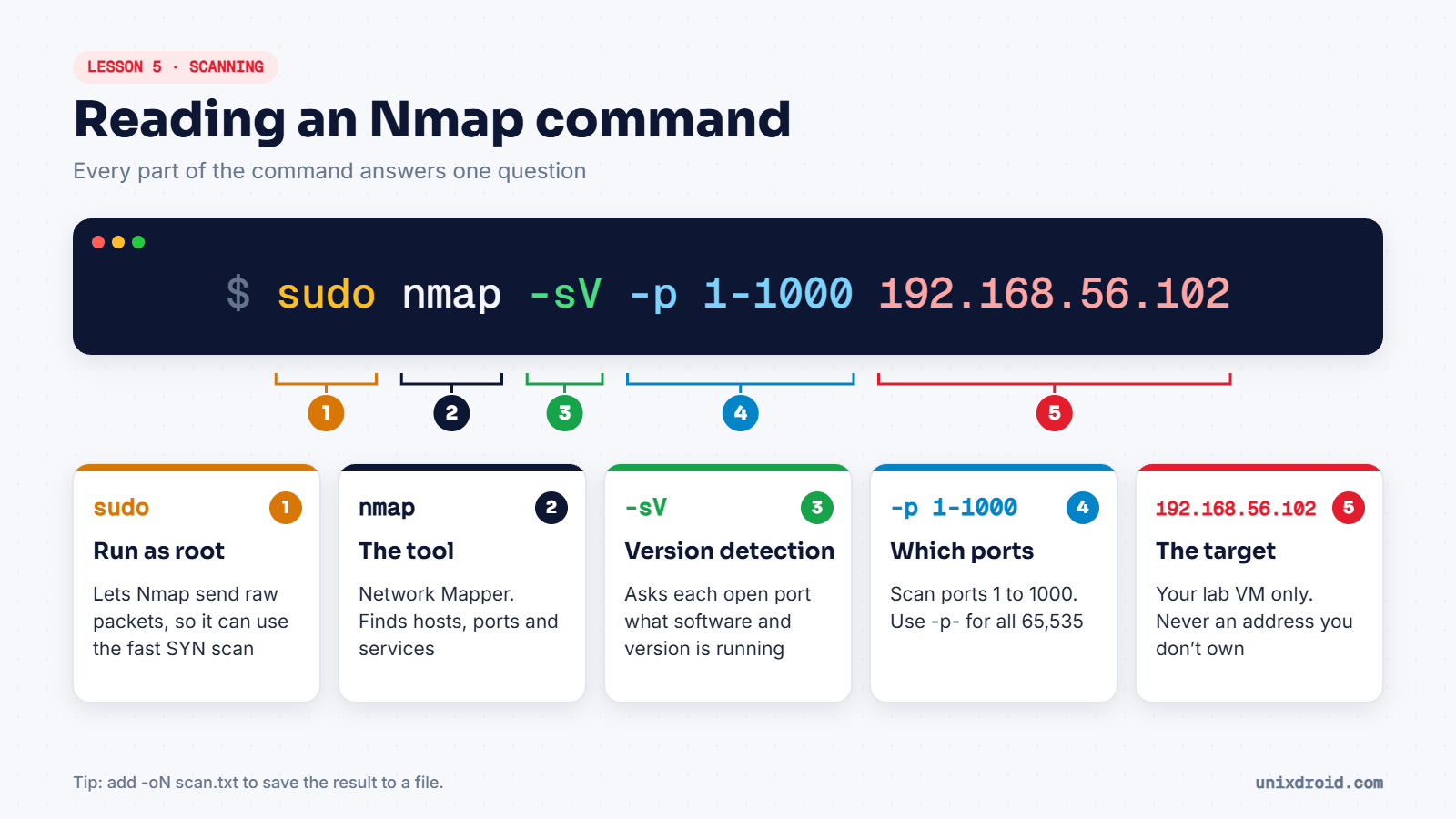
Step 1: Find your target
Start Kali and Metasploitable. In Kali, list every live machine on the lab network:
sudo nmap -sn 192.168.56.0/24-sn means "find hosts, but don't scan ports". You'll see a few addresses: usually your host (.1), Kali, Metasploitable, and sometimes the VirtualBox DHCP server.
Step 2: A basic scan
sudo nmap 192.168.56.102With no options, Nmap checks the 1,000 most common TCP ports. Metasploitable will give you a long list. Here's part of it:
PORT     STATE SERVICE
21/tcp   open  ftp
22/tcp   open  ssh
23/tcp   open  telnet
25/tcp   open  smtp
80/tcp   open  http
139/tcp  open  netbios-ssn
445/tcp  open  microsoft-ds
3306/tcp open  mysql
The SERVICE column here is only a guess based on the port number. We'll fix that in step 4.
Step 3: Open, closed and filtered
When you use sudo, Nmap's default is a SYN scan. It sends the first packet of a TCP handshake and judges the port by the reply.
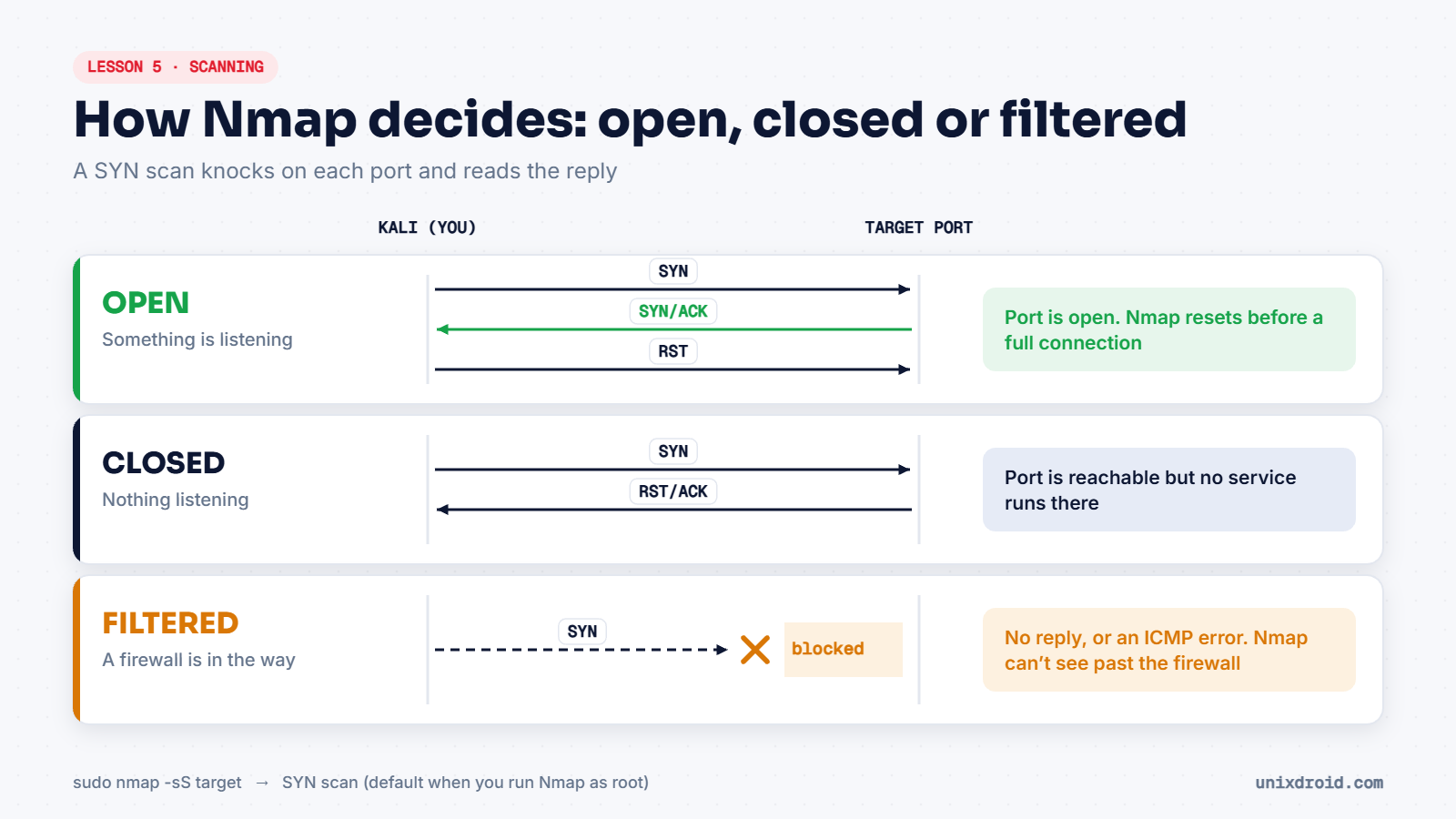
| State | What it means |
|---|---|
open | A program is listening and accepting connections |
closed | The machine is reachable, but nothing listens on that port |
filtered | A firewall blocked the probe, so Nmap can't tell |
Without sudo, Nmap can't send these raw packets, so it falls back to a full connect scan (-sT). It still works, but it's slower and more likely to be logged.
Step 4: Find the real software versions
Version detection makes Nmap talk to each open port and identify what is really running:
sudo nmap -sV -p 21,22,80 192.168.56.102PORT STATE SERVICE VERSION
21/tcp open ftp vsftpd 2.3.4
22/tcp open ssh OpenSSH 4.7p1 Debian 8ubuntu1 (protocol 2.0)
80/tcp open http Apache httpd 2.2.8 ((Ubuntu) DAV/2)Now you have something to research. Search for "vsftpd 2.3.4" and you'll find that this exact version was once distributed with a backdoor hidden inside it. This is how testers move from scanning to the next phase: get the exact version, then research it.
Step 5: Save your results
Always save scans, so you have them for your notes and your report:
sudo nmap -sV -oN lab-scan.txt 192.168.56.102-oN saves normal text output. -oA lab-scan saves three formats at once.
Options worth remembering
| Option | What it does |
|---|---|
-sn | Find live hosts, no port scan |
-p 80,443 | Scan only these ports |
-p- | Scan all 65,535 ports |
-sV | Detect service versions |
-O | Guess the operating system |
-A | Versions, OS, default scripts and traceroute together |
-T4 | Faster timing, fine for labs |
-oN file.txt | Save the output to a file |
On real client networks, start gentle. Loud options like
-Aor-T5can slow down, or even crash, fragile devices such as old printers.
Want to go deeper into what those port numbers mean? Read our guide to ports and protocols.