
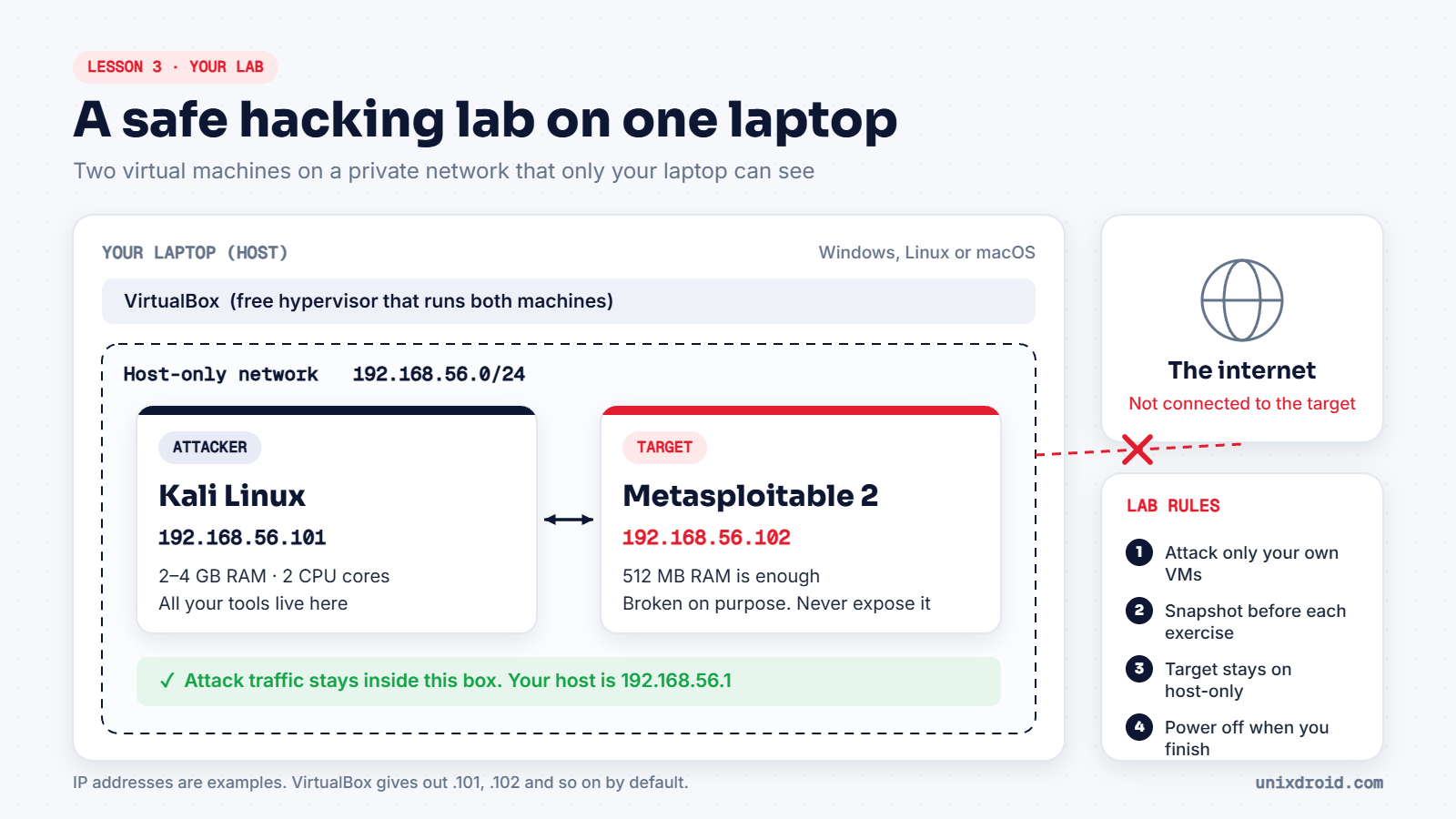
You need something to practise on that you're allowed to attack. The safest answer is a lab inside your own laptop: two virtual machines that can talk to each other, but not to anyone else.
What you need
| Item | Why | Cost |
|---|---|---|
| A laptop with 8 GB RAM or more | Runs two VMs at the same time | — |
| VirtualBox | Runs the virtual machines | Free |
| Kali Linux (VirtualBox image) | Your attacker machine | Free |
| Metasploitable 2 | A target that is broken on purpose | Free |
4 GB of RAM can work, but it will be slow. Also check that virtualisation (Intel VT-x or AMD-V) is turned on in your BIOS, otherwise VMs won't start.
Step 1: Install VirtualBox
Download it from virtualbox.org and install it like any other program.
Step 2: Check the private network
In VirtualBox, open File → Tools → Network Manager and go to the Host-only Networks tab. There should be one network there (called vboxnet0 on Linux and macOS, or VirtualBox Host-Only Ethernet Adapter on Windows) with its DHCP server switched on. If there isn't, click Create. Its default range is 192.168.56.0/24.
This network exists only inside your laptop. Machines on it can reach each other and your host, but not the internet.
Step 3: Add Kali Linux
Go to kali.org, open Virtual Machines, and download the VirtualBox image. It's a ready-made machine, so there's nothing to install. Extract the .7z file and double-click the .vbox file inside to add it to VirtualBox.
The default login is kali / kali. Change the password as soon as you're in:
passwdStep 4: Add Metasploitable 2
Metasploitable 2 is made by Rapid7 and is packed with old, vulnerable software on purpose. Download it from SourceForge, extract the zip, then create a new VM in VirtualBox:
- Type: Linux, Version: Other Linux (32-bit)
- Memory: 512 MB
- Hard disk: choose Use an existing virtual hard disk file and pick the
Metasploitable.vmdkyou extracted
The login is msfadmin / msfadmin.
Never put Metasploitable on a bridged network, and never give it internet access. It's built to be hacked, and anyone who can reach it could do exactly that.
Step 5: Put both machines on the private network
For each VM, open Settings → Network → Adapter 1, set Attached to to Host-only Adapter, and pick the network from step 2.
For Kali only, you can switch on Adapter 2 as NAT so it can still download updates. Don't do this for Metasploitable.
Step 6: Check they can see each other
Start both machines. On Metasploitable, find its IP address:
ifconfigOn Kali, use the newer command:
ip aLook for addresses starting with 192.168.56.. Then, from Kali, ping the target (use your target's real IP):
ping -c 4 192.168.56.102If you see four replies, your lab works.
Step 7: Take a snapshot
Before you do anything else, take a snapshot of both machines (Machine → Take Snapshot). If you break something while practising, you can go back to this clean state in seconds. Get into the habit of taking one before every exercise.
That's it. You now have a private, legal place to practise everything in this path.