
You use Kali Linux every day. You know nmap, you've fired up Burp Suite, maybe you've even popped your first shell. But I bet you don't know these 5 facts about the OS you're using. Number three surprises everyone, and you can try it yourself in about 5 seconds.
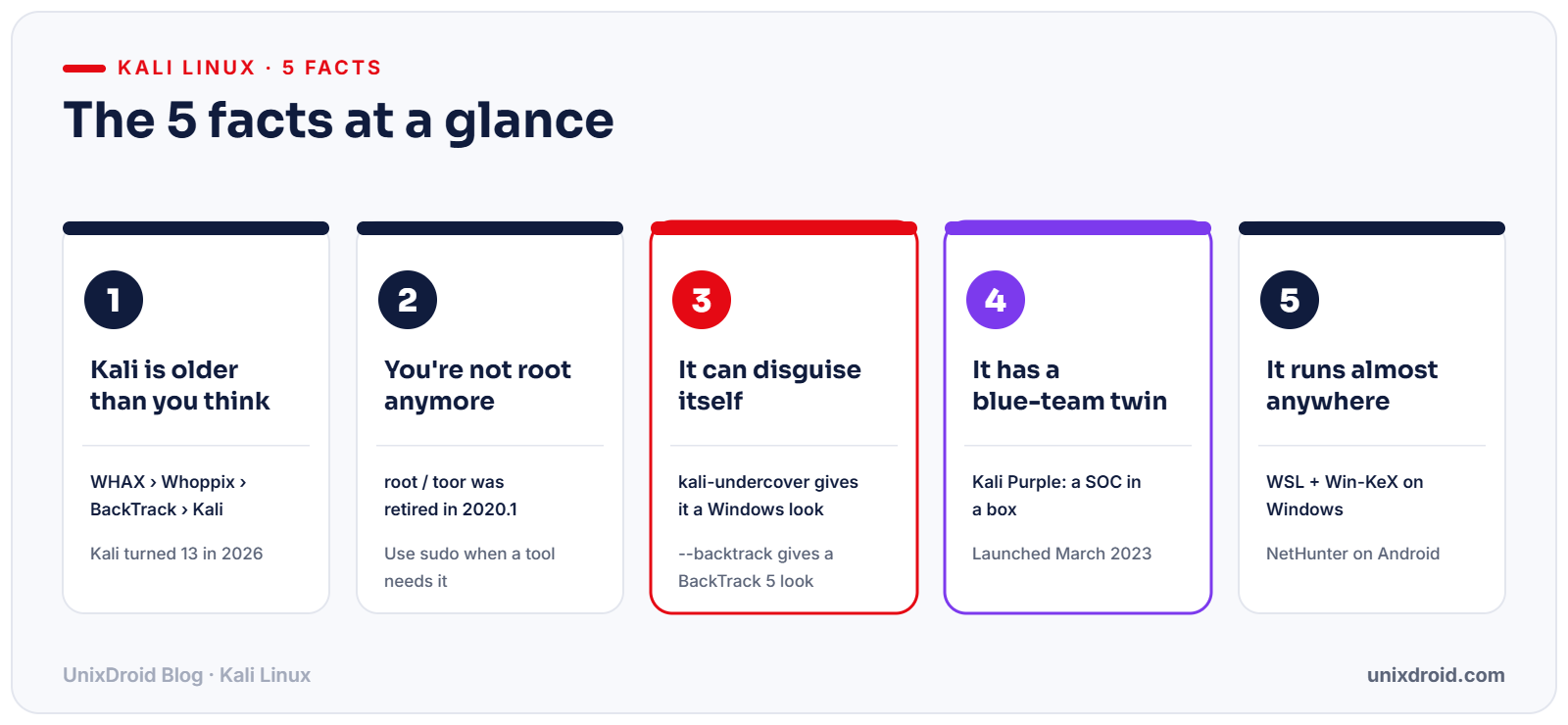
Fact #1: Kali is much older than you think
Kali Linux officially launched in 2013, and celebrated its 13th birthday in 2026. But its story starts long before that. Kali is the latest name in a family tree of hacking distros: WHAX → Whoppix → BackTrack → Kali.
BackTrack was the legendary pentesting distro of the late 2000s, and 2026 marks its 20th anniversary. When the same team rebuilt it from scratch on top of Debian, it got a new name: Kali. Today it's maintained by OffSec, the company behind the OSCP certification.
That history explains a lot of Kali's habits, including the next fact.
Try it: see exactly which Kali release you're on:
grep VERSION /etc/os-release
uname -r
Fact #2: You're not root anymore (and that's a good thing)
For years, every tutorial started the same way: log in as root, password toor. That default came all the way from BackTrack and its predecessors.
Then, in Kali 2020.1, it was retired. Kali switched to a normal, non-root user by default. On the Live image you log in as kali / kali, and when you install Kali you create your own user. The root account doesn't even have a password set out of the box.
Why the change? Most tools simply don't need root anymore, and running everything as root means one bad command or one malicious script can wreck the whole system. Now you use sudo only when a tool actually needs it.
Try it: you can see the difference root makes with Nmap. As a normal user it can't craft raw packets, so it falls back to a full TCP connect scan. With sudo it uses the faster, quieter SYN scan:
nmap -v -p 22,80 scanme.nmap.org        # look for: "Initiating Connect Scan"
sudo nmap -v -p 22,80 scanme.nmap.org   # look for: "Initiating SYN Stealth Scan"
scanme.nmap.org is a host the Nmap project lets anyone scan for practice. Never scan systems you don't have permission to test.
Fact #3: Kali can disguise itself as Windows 🤯
Here's the one that surprises everyone. Kali has a built-in Undercover Mode that makes your desktop look like a Windows desktop in one command. It arrived in Kali 2019.4 with a simple idea: hide in plain sight.
Picture yourself on a laptop in a college library, café or office. A full-screen Kali desktop with a dragon wallpaper and terminals full of exploits draws attention. Undercover mode makes your screen look boringly normal, so nobody looks twice.
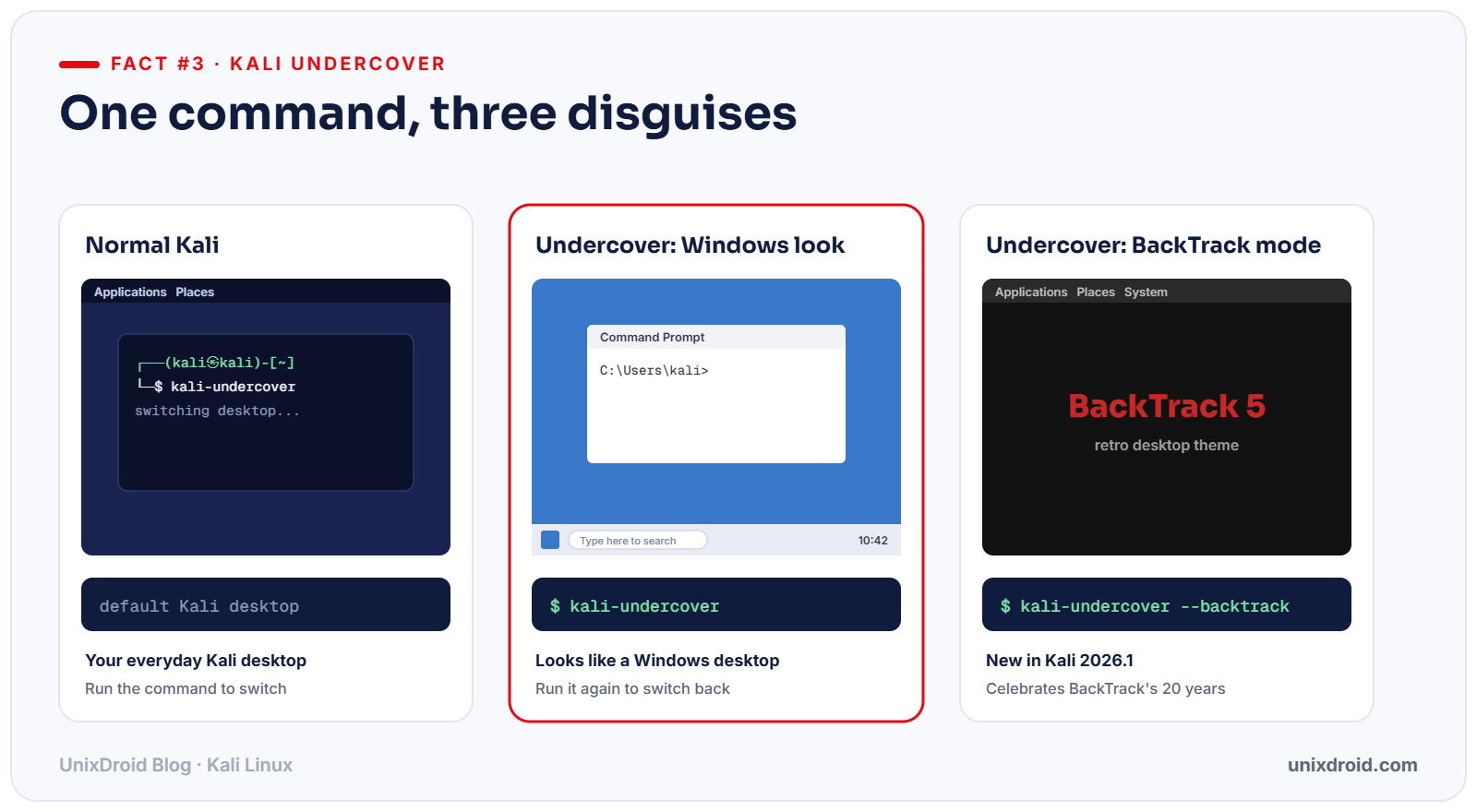
Try it (it's built into the default Xfce desktop):
kali-undercoverYour wallpaper, theme, icons and taskbar instantly switch to a Windows-style layout. Run the same command again to switch back. You can also launch it from the menu by searching for Kali Undercover Mode.
And it got even better in Kali 2026.1. To celebrate BackTrack's 20th anniversary, Undercover gained a BackTrack mode, which turns your desktop into a throwback to BackTrack 5:
kali-undercover --backtrackImportant: Undercover only changes how your desktop looks. To the network you're still a Linux machine. Run
sudo nmap -Oagainst your Kali box from another VM and Nmap will still say "Linux". It fools eyes, not scanners.
Want the full guide? Read Kali Undercover Mode: Make Kali Linux Look Like Windows in One Click for setup, fixes and a hands-on scanner test.
Fact #4: Kali has a blue-team twin called Kali Purple
Everyone thinks of Kali as a hacking OS. But in March 2023, for Kali's 10th anniversary, OffSec launched Kali Purple, a version built for defenders.
Kali Purple is designed as a "SOC in a box": a ready-made platform for practising the blue-team side of security:
- Collecting and searching logs in a SIEM
- Detecting attacks with intrusion detection tools
- Threat hunting and incident response
- Testing your defences against attacks you run yourself
Its tool menu is organised around the five functions of the NIST Cybersecurity Framework: Identify, Protect, Detect, Respond and Recover. It's still actively released, with a fresh installer image shipping alongside every Kali release.
Why this matters to you: if you're aiming for a SOC analyst job, Kali Purple lets you practise defence in the same ecosystem you already know. Pair it with your normal Kali as the attacker and you have a full purple-team lab. Start with our free SOC Analyst path. Want the full picture, tools and a first hands-on lab? Read Kali Purple Explained.
Fact #5: Kali runs almost anywhere, even inside Windows and on your phone
Most people only know Kali as a VM or a USB stick. But Kali runs in at least 8 different places:
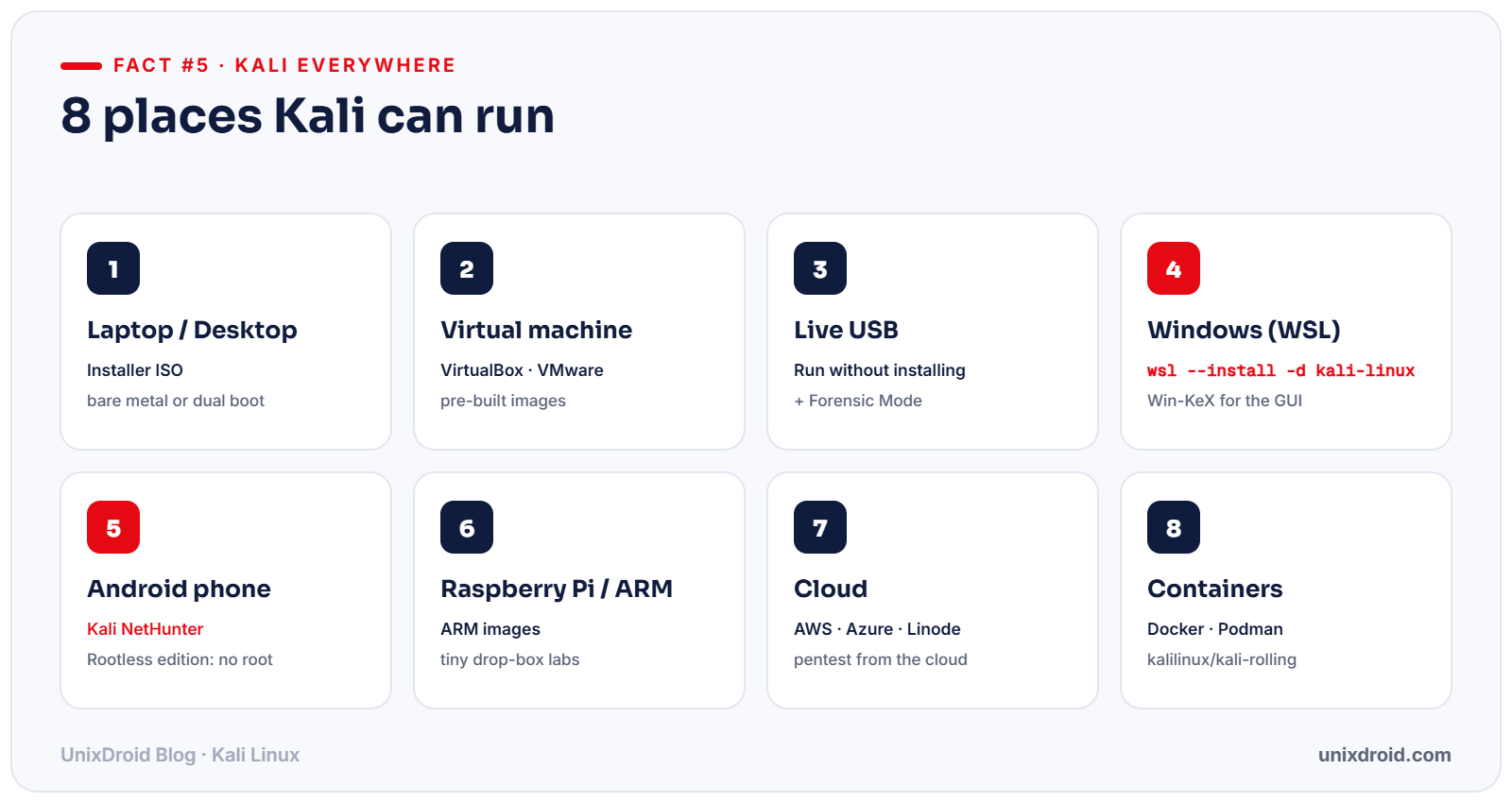
Inside Windows, with no VM at all (WSL)
Kali is available as an app for Windows Subsystem for Linux. With Win-KeX you even get the full Kali desktop in a window on your Windows PC:
# In PowerShell (as Administrator)
wsl --install -d kali-linux
# Then inside Kali
sudo apt update && sudo apt install -y kali-win-kex
kex --win -s # full Kali desktop in a window, with soundOn your Android phone (NetHunter)
Kali NetHunter puts Kali on Android. The NetHunter Rootless edition, also introduced in 2020.1, runs on most Android phones without rooting them, using the NetHunter Store and Termux. You get a real Kali terminal in your pocket.
And more
- Raspberry Pi and other ARM boards: tiny, cheap "drop box" machines for labs
- Cloud: official images for AWS, Azure and Linode
- Containers:
docker run -it kalilinux/kali-rollinggives you a minimal Kali in seconds. Add tools withsudo apt install kali-linux-headless
Bonus fact: Kali has a hidden Forensic Mode
Your Kali Live USB has one more secret: a boot option called Forensic Mode that lets you investigate a computer's disk without changing a single byte. We covered it step by step in Kali Linux Forensic Mode: The Hidden Boot Option Most Users Never Click.
Cheat sheet: try all 5 in 5 minutes
| Fact | Command to try |
|---|---|
| #1 Kali's version | grep VERSION /etc/os-release |
| #2 Root vs non-root | nmap -v -p 80 scanme.nmap.org, then the same with sudo |
| #3 Undercover mode | kali-undercover (and kali-undercover --backtrack) |
| #4 Kali Purple | Download the Purple installer image from Kali's downloads page |
| #5 Kali in Windows | wsl --install -d kali-linux then sudo apt install -y kali-win-kex |
So, which one surprised you?
Kali is more than a box of hacking tools. It's 20 years of history, a security model that grew up, a desktop that can go undercover, a defensive twin and a system that runs from your phone to the cloud. The more you understand your tools, the better you'll use them.
Just installed Kali? Read You Installed Kali Linux. Do These 5 Things First. Want a safe place to practise everything here? Build your own lab with our free Home Lab Setup path.
Tell us which fact surprised you most, and follow @unixdroid.in for daily Kali Linux tips.