
"I'm buying a laptop to learn hacking. Is 8GB of RAM enough, or do I need 16GB?"
I get this question in my DMs almost every day. Some people are already looking at 32GB gaming laptops, just because a video told them that "a hacker needs a powerful machine".
Here's the short answer first, then the details:
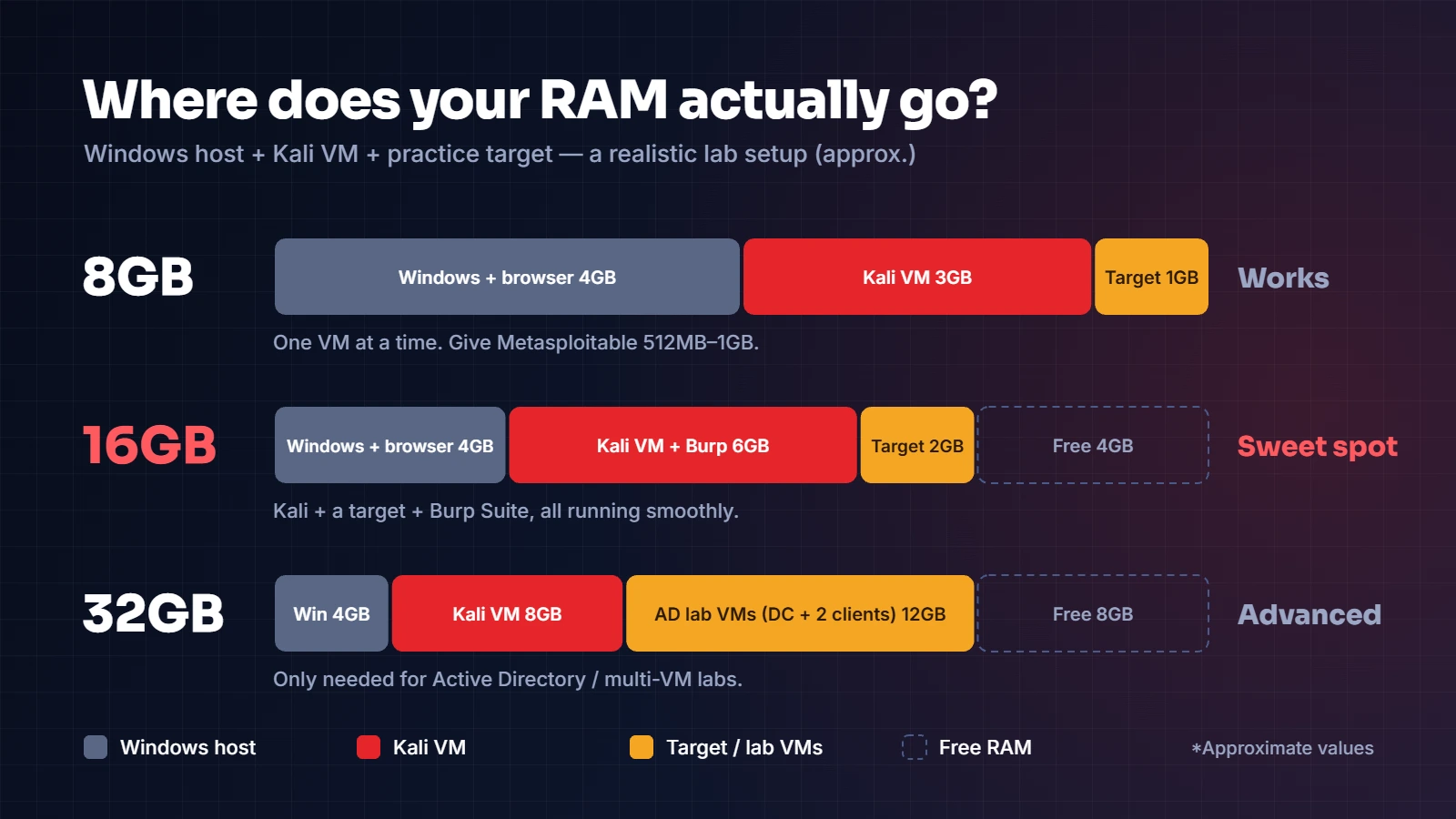
- 8GB RAM is enough to start learning. Kali Linux runs fine in a virtual machine, as long as you run one VM at a time.
- 16GB RAM is the sweet spot. Kali + a target machine + Burp Suite, all at once, without freezing.
- 32GB RAM isn't necessary for most beginners. It only pays off when you run 3–4 VMs together, like in Active Directory labs.
If you already own an 8GB laptop, you don't need a new one. You can start today, and this post shows you how.
How much RAM does Kali Linux actually need?
According to the official Kali Linux docs, a default install (Xfce desktop + default tools) needs at least 2GB of RAM and 20GB of disk space. A bare SSH server with no desktop can run on as little as 128MB–512MB.
So Kali itself is not a heavy operating system. The real issue is somewhere else.
Most students run Kali inside Windows using VirtualBox or VMware, and for beginners that's the safest way to do it. In that setup your RAM gets split three ways:
- Windows (the host): Windows plus a few Chrome tabs usually takes 3–4GB on its own.
- Kali VM: whatever you give the VM is taken away from Windows. 3–4GB is comfortable.
- Target VM: the machine you practice on (like Metasploitable 2 or DVWA) needs 512MB to 2GB.
So the real question isn't "how much RAM does Kali need?" It's "how much RAM does your whole lab need?"
Burp Suite: the real RAM eater
If you learn web hacking, you'll be living in Burp Suite. It runs on Java and it loves memory. PortSwigger (the company behind Burp) recommends 16GB of RAM as a good general-purpose spec, and the Kali docs also point to 8GB or more for heavy tools like Burp.
That doesn't mean Burp won't run on an 8GB laptop. It will, if you're smart about it:
- Set a maximum memory limit in Burp's settings so it can't eat all your RAM.
- Use a disk-based project instead of a temporary one. Temporary projects keep everything in memory.
- Disable extensions you aren't using.
8GB vs 16GB vs 32GB: what each one can run
| RAM | Give the Kali VM | What runs comfortably | Best for |
|---|---|---|---|
| 8GB | 3–4GB | Kali + browser, or Kali + one light target VM | Linux commands, Nmap, TryHackMe, basic labs |
| 16GB | 4–6GB | Kali + 1–2 target VMs + Burp Suite | Web hacking, CTFs, OSCP-style practice |
| 32GB | 6–8GB | Kali + Windows Server (DC) + 2 Windows clients | Active Directory labs, red team practice, malware analysis |
One thing worth knowing: labs for certifications like OSCP are remote (you connect over VPN). Only Kali runs on your laptop, so 16GB is plenty to prepare.
Have an 8GB laptop? Make it run smoothly
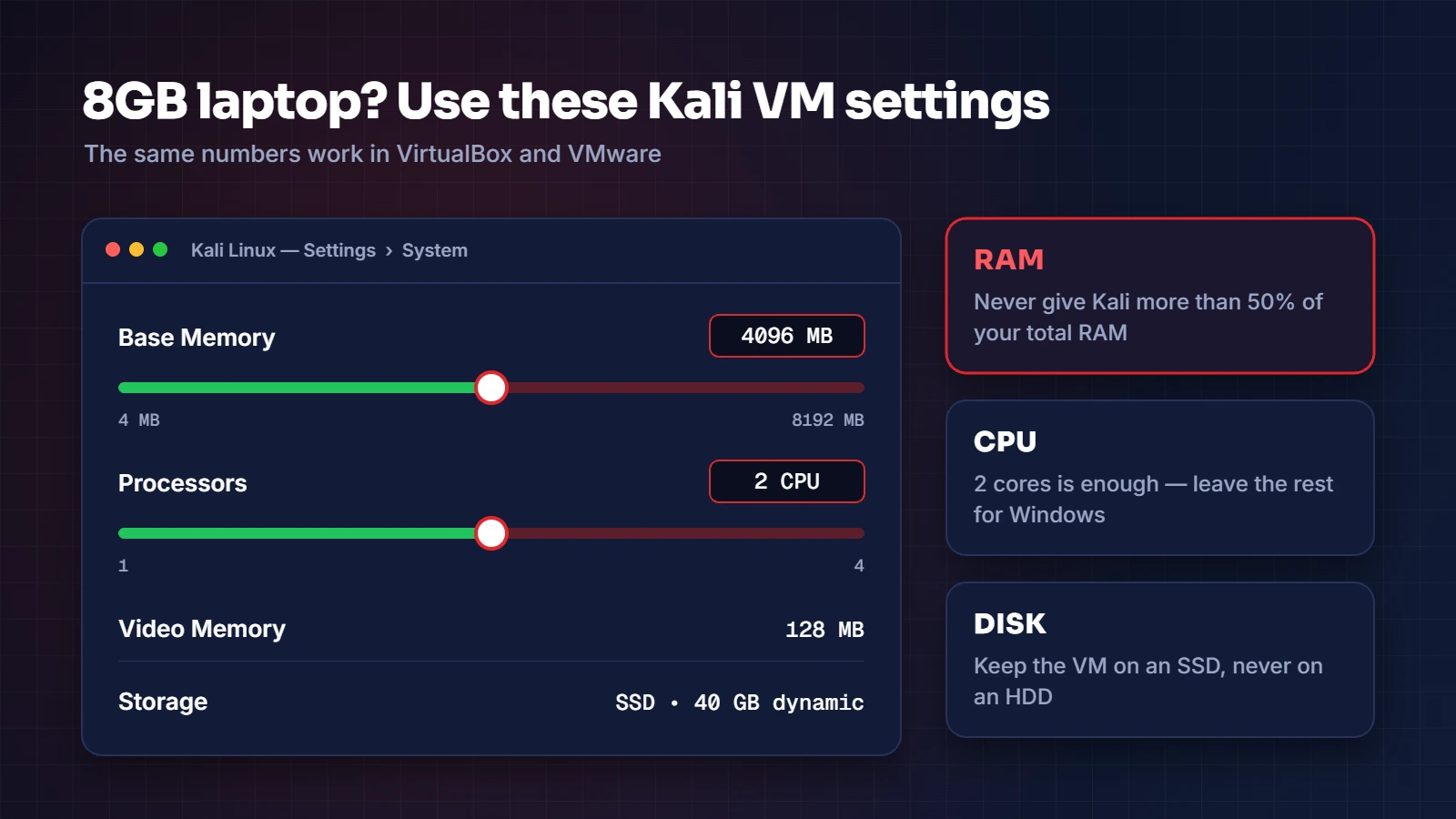
- Give the Kali VM 4GB of RAM and 2 CPU cores. Never give a VM more than 50% of your total RAM, or Windows starts choking and both get slow.
- Close those 20 Chrome tabs while the VM is running. The browser is the biggest RAM thief on your machine.
- Run one VM at a time. If you need a target too, give it 512MB–1GB. Metasploitable 2 runs fine on that.
- Keep your VMs on an SSD. A VM on a hard drive feels slow no matter how much RAM you have. 8GB + SSD feels smoother than 16GB + HDD.
- Turn on virtualization in the BIOS (Intel VT-x / AMD-V). If it's off, your VM will crawl or won't start at all.
- Use cloud labs. TryHackMe's AttackBox and Hack The Box's Pwnbox run in your browser, so your laptop's RAM barely matters. Here's how the two compare.
- Try dual boot or a live USB. When Kali runs directly on the hardware, it gets all 8GB instead of sharing with Windows.
Just installed Kali? Do these 5 things first.
Buying a new laptop? Check these before RAM
- Is the RAM upgradeable? Many thin laptops have RAM soldered to the motherboard, so you can never add more. Best options: 8GB with a free slot, or 16GB from the start.
- SSD (512GB or more). Each VM takes 20–80GB.
- CPU virtualization support. Almost every modern i5 / Ryzen 5 has it. You just have to enable it in the BIOS.
- Planning Wi-Fi hacking? Most built-in laptop Wi-Fi cards don't support monitor mode. You'll need a separate USB Wi-Fi adapter, and that has nothing to do with RAM.
- Into password cracking? Hashcat runs on the GPU, not RAM. That's where a gaming laptop actually helps.
Myth: "More RAM = better hacker"
Hacking is a skill, not a hardware spec. Linux commands, networking, Nmap and web basics are learned just as well on an 8GB laptop as on a 32GB one. A 32GB machine won't make you a hacker. Daily practice will.
Not sure where to start? Read Kali Linux vs Windows for learning hacking, then start practicing with these 25 Linux commands.
My straight recommendation
- Student on a tight budget: 8GB (upgradeable) + SSD. Start learning now and upgrade to 16GB later.
- Buying new with a decent budget: 16GB + 512GB SSD. It will comfortably last you 3–4 years.
- 32GB: only if you're sure you'll run AD labs or several VMs at once.
A quick reminder: always practice in your own lab or on legal platforms like TryHackMe and Hack The Box. "Practicing" on someone else's system without permission is illegal.
FAQs
Can Kali Linux run on 4GB of RAM? Yes, if you install Kali directly (dual boot) or run it from a live USB. Running it in a VM on a 4GB laptop will struggle, because Windows takes half the RAM by itself.
How much RAM should I give a Kali Linux VM? 3–4GB on an 8GB laptop, 4–6GB on a 16GB laptop. The simple rule: never give a VM more than half of your total RAM.
Is 8GB of RAM enough for ethical hacking? For learning, absolutely. You'll only feel the limit when you need Kali, a target VM and Burp Suite running at the same time. That's where 16GB makes a difference.
16GB or 32GB for ethical hacking? 16GB for 99% of beginners. Go for 32GB only if you plan to run Active Directory labs or 3–4 VMs at once.
Does DDR4 vs DDR5 matter? Hardly, for learning hacking. Capacity (how many GB) and having an SSD matter much more than RAM speed.
Can I learn hacking on my phone with Termux? It's fine for Linux commands and basics, but for VMs, Burp Suite and proper labs you need a laptop.