
Most people meet Kali Linux as a hacking OS. You boot it, you scan, you exploit, you break in. That's the red team side of security: you play the attacker.
But every attack in the real world has someone on the other side trying to spot it and stop it. In March 2023, for Kali's 10th anniversary, the Kali team launched a version built for those people. It's called Kali Purple, and it flips the script: instead of attacking, you detect and defend.
In this post you'll learn what Kali Purple is, what "red, blue and purple team" actually mean, which tools it ships with, how to install it (or add it to the Kali you already have), and a simple home-lab exercise to practise your first detection.
What is Kali Purple?
Kali Purple is the defensive edition of Kali Linux. It was introduced with Kali Linux 2023.1 on 13 March 2023, and the Kali team described it as "the one-stop shop for blue and purple teams".
Under the hood it's still Kali: same Debian base, same updates, same red-team tools if you want them. What's different is what's added on top:
- 100+ defensive tools for monitoring, detection, analysis and incident response.
- A "SOC-in-a-box" idea: a reference setup for building a small Security Operations Center to learn in, practise threat hunting, test your defences and run red vs blue exercises.
- A menu organised around the NIST Cybersecurity Framework instead of attack phases.
- Its own purple theme, installer, documentation wiki and community Discord.
Think of normal Kali as the burglar's toolkit and Kali Purple as the security guard's control room. You'll learn the most by using both.
Red team, blue team, purple team: what the colours mean
These terms come from military war-games and are now everyday cybersecurity jobs:
- Red team: the attackers. They think like real hackers and try to break in, with permission. Pentesters and red teamers live here. This is what normal Kali is built for.
- Blue team: the defenders. They watch logs and network traffic, detect attacks, respond to incidents and harden systems. SOC analysts are blue team.
- Purple team: red and blue working together. The red side runs an attack, the blue side checks whether they caught it, and both improve. Red + blue = purple, hence the name.
That's why one distro covers both blue and purple teams: with Kali Purple you can attack your own lab and then see whether your defences noticed.
The five menus: built on NIST CSF
Open the menu in normal Kali and tools are grouped the way an attacker works: information gathering, vulnerability analysis, exploitation, and so on.
Kali Purple's defensive menu follows the five core functions of the NIST Cybersecurity Framework (CSF), the same model real security teams use to organise their work:
- Identify: know what you have and where it's weak. Asset inventory, vulnerability scanning, risk.
- Protect: reduce the chance of an attack working. Hardening, access control, defensive configuration.
- Detect: notice when something bad is happening. Intrusion detection, network monitoring, log analysis.
- Respond: act on an incident. Case management, investigation, containment.
- Recover: get back to normal. Restore systems and learn from what happened.
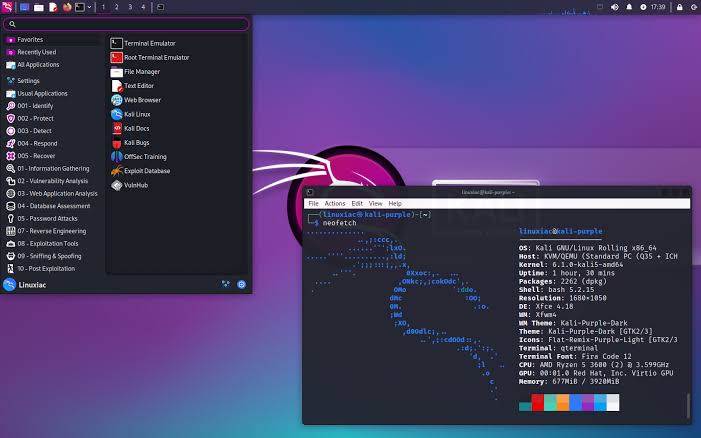
The Kali Purple menu: the five NIST CSF categories (001 to 005) sit above the usual attack categories. Screenshot: Linuxiac.
Learning this framework is a bonus in itself. It comes up in SOC interviews, GRC roles and security certifications all the time.
The tools worth knowing first
You don't need to learn 100 tools. Start with these, because they're the same kinds of tools you'll see in real SOC jobs:
- Suricata: a network IDS/IPS. It inspects traffic against rule sets and raises an alert when it sees something suspicious, like a port scan or exploit attempt.
- Zeek: a network monitoring tool that turns raw traffic into clean logs (connections, DNS, HTTP, files). Brilliant for threat hunting.
- Arkime: captures and indexes full packet data, so you can search and replay network sessions later.
- Elastic Security: a SIEM (Security Information and Event Management) built on Elasticsearch and Kibana. It collects logs from many machines into one place to search, build dashboards and raise detections.
- TheHive: an incident response platform where analysts create cases, track alerts and work an investigation as a team.
- GVM (Greenbone): a vulnerability scanner that finds weaknesses in your own systems before attackers do.
- Malcolm: a full network traffic analysis suite that bundles tools like Zeek, Suricata and Arkime with dashboards.
- CyberChef: the "cyber Swiss-army knife" for decoding, decrypting and transforming data during an investigation (Base64, hex, XOR and hundreds more).
Already know Splunk? Elastic Security does the same job in an open-source stack, so your SIEM skills transfer directly.
Two extras: Kali Autopilot and Kali Purple Hub
Kali Purple also launched with two features made for purple-team practice:
- Kali Autopilot: an attack script builder and framework for automated attacks. You script an attack once, replay it whenever you like, and check whether your detections fire every time. That's purple teaming in a nutshell.
- Kali Purple Hub: a place for the community to share practice pcaps (recorded network traffic) and Autopilot scripts for blue-team exercises.
How to get Kali Purple
Option 1: Install the Kali Purple ISO
Kali Purple has its own installer image on the official Get Kali page (look for the Purple section). It's an amd64 (64-bit PC) installer of around 4–5 GB, and a new image ships alongside regular Kali releases.
Install it in VirtualBox or VMware like any other Kali installer. Give the VM at least 8 GB of RAM if you plan to run the Elastic SIEM, because Elasticsearch is hungry for memory. 4 GB is the bare minimum for just trying the tools.
Option 2: Add the defensive tools to your existing Kali
Already have Kali? The defensive tools are grouped into five metapackages, one per NIST CSF function. Update first, then install the ones you want:
sudo apt update && sudo apt full-upgrade -y

# install one group…
sudo apt install -y kali-tools-detect

# …or all five
sudo apt install -y kali-tools-identify kali-tools-protect kali-tools-detect kali-tools-respond kali-tools-recover
This is a big download. Make sure you have plenty of free disk space before installing all five.
Tip: Kali Purple installs the tools, but it doesn't pre-wire a full SOC for you. Connecting the SIEM, the IDS and the case management platform is up to you. That sounds like extra work, but it's exactly what you'd do in a real SOC job, so treat it as part of the learning. The Kali Purple community wiki has step-by-step guides.
Your first purple-team exercise: catch your own Nmap scan
Here's a simple lab you can run with two VMs on the same host-only network:
- Attacker: your normal Kali VM.
- Defender: your Kali Purple VM (or Kali with
kali-tools-detectinstalled).
Step 1: On the defender, update Suricata's rules and start it on your lab interface (check yours with ip a; here it's eth0):
sudo suricata-update
sudo suricata -c /etc/suricata/suricata.yaml -i eth0
Step 2: In a second terminal on the defender, watch the alert log:
sudo tail -f /var/log/suricata/fast.logStep 3: On the attacker, scan the defender (use the defender's IP):
sudo nmap -sS -sV 192.168.56.102Within seconds, alerts start appearing in fast.log, often tagged ET SCAN from the Emerging Threats rule set. Congratulations: you just ran a purple-team exercise. The red side attacked, the blue side detected, and you can now ask the real questions: Which scan types did I catch? Which did I miss? How would I alert on this in a SIEM?
Try again with a slower scan (-T1) and see whether your detections still fire. That cat-and-mouse loop is how both attackers and defenders get better. New to scanning? Read Nmap for Beginners first.
Is Kali Purple still a "technical preview"?
When it launched, the Kali team called it an initial technical preview "still in its infancy", with a plan to grow from proof of concept to framework to platform. Since then it has kept shipping as its own installer image alongside Kali releases, so it's very much alive.
Be realistic though: it's a learning and lab platform, not a turnkey enterprise SOC. Expect to read docs, fix configs and connect services yourself. For a student, that's a feature, not a bug.
Who should use Kali Purple?
- Aspiring SOC analysts. It's the cheapest way to get hands-on with an IDS, a SIEM and an incident response tool on your own laptop. See What Does a SOC Analyst Actually Do? for how these tools map to the job.
- Pentesters who want to level up. Knowing what defenders see makes you a far better attacker, and a far better report writer.
- Students preparing for interviews. "I built a home SOC with Suricata, Zeek and Elastic, then detected my own attacks" is a strong line on any resume.
- Small teams and labs that want a free, open-source defensive toolkit to experiment with.
A quick word on legality
Monitoring tools capture real network traffic, which can include other people's data. Only run Suricata, Zeek, Arkime and friends on networks you own or are explicitly authorised to monitor, and only attack your own lab machines. Your home lab is the perfect place for both.
FAQ
Is Kali Purple a separate operating system?
Not really. It's Kali Linux with a defensive toolset, a NIST CSF menu, its own theme and its own installer image. You can also add the same tools to normal Kali with the kali-tools-* metapackages.
Is Kali Purple free? Yes. Like Kali, it's free to download and use, and the tools inside it are open source.
Do I need Kali Purple if I only want to learn hacking? No, normal Kali is enough. But learning a bit of the defender's side will make you a better ethical hacker, and it's essential if you want a SOC job.
How much RAM does Kali Purple need? For trying the tools, 4 GB works. For running the Elastic SIEM comfortably, give it 8 GB or more.
Does Kali Purple replace Splunk or a commercial SIEM? For learning, it covers the same ideas with open-source tools. In a company, it's better seen as a lab and testing platform than a drop-in replacement for an enterprise SIEM.
When was Kali Purple released? On 13 March 2023, with Kali Linux 2023.1, for Kali's 10th anniversary.
Wrapping up
Normal Kali teaches you how attacks work. Kali Purple teaches you how they get caught. Use them together, attack from one and defend with the other, and you'll understand security from both sides of the wire. That's exactly what employers are looking for.
Want more? Read Kali Undercover Mode: Make Kali Linux Look Like Windows in One Click, 5 Kali Linux Facts You Didn't Know, Kali Linux Forensic Mode: The Hidden Boot Option Most Users Never Click and CEH vs Security+ vs OSCP: Which Certification Should You Take First?.