
Every skill in cybersecurity is learned by doing: scanning, exploiting, defending, breaking things and fixing them. But you can't practise on real systems you don't own. In India that's an offence under Sections 43 and 66 of the IT Act, and it's illegal almost everywhere else too. A home lab solves this. It's a set of virtual computers running on your own PC that you're free to attack, crash and rebuild as often as you like.
By the end of this path you'll have a complete lab: an attacker machine, Linux and Windows targets, a real Active Directory domain and a deliberately vulnerable server, all on a private network that can't touch your home Wi-Fi.
What is a virtual machine?
A virtual machine (VM) is a computer inside your computer. A program called a hypervisor gives each VM a slice of your real CPU, RAM and disk. The VM thinks it's a normal PC: it boots, installs an operating system and runs programs, without touching your real Windows or Linux.
That gives you three superpowers:
- Safety: malware or a broken config stays inside the VM.
- Undo: a snapshot lets you roll back to a working state in seconds.
- Many machines, one PC: run an attacker and several targets side by side.
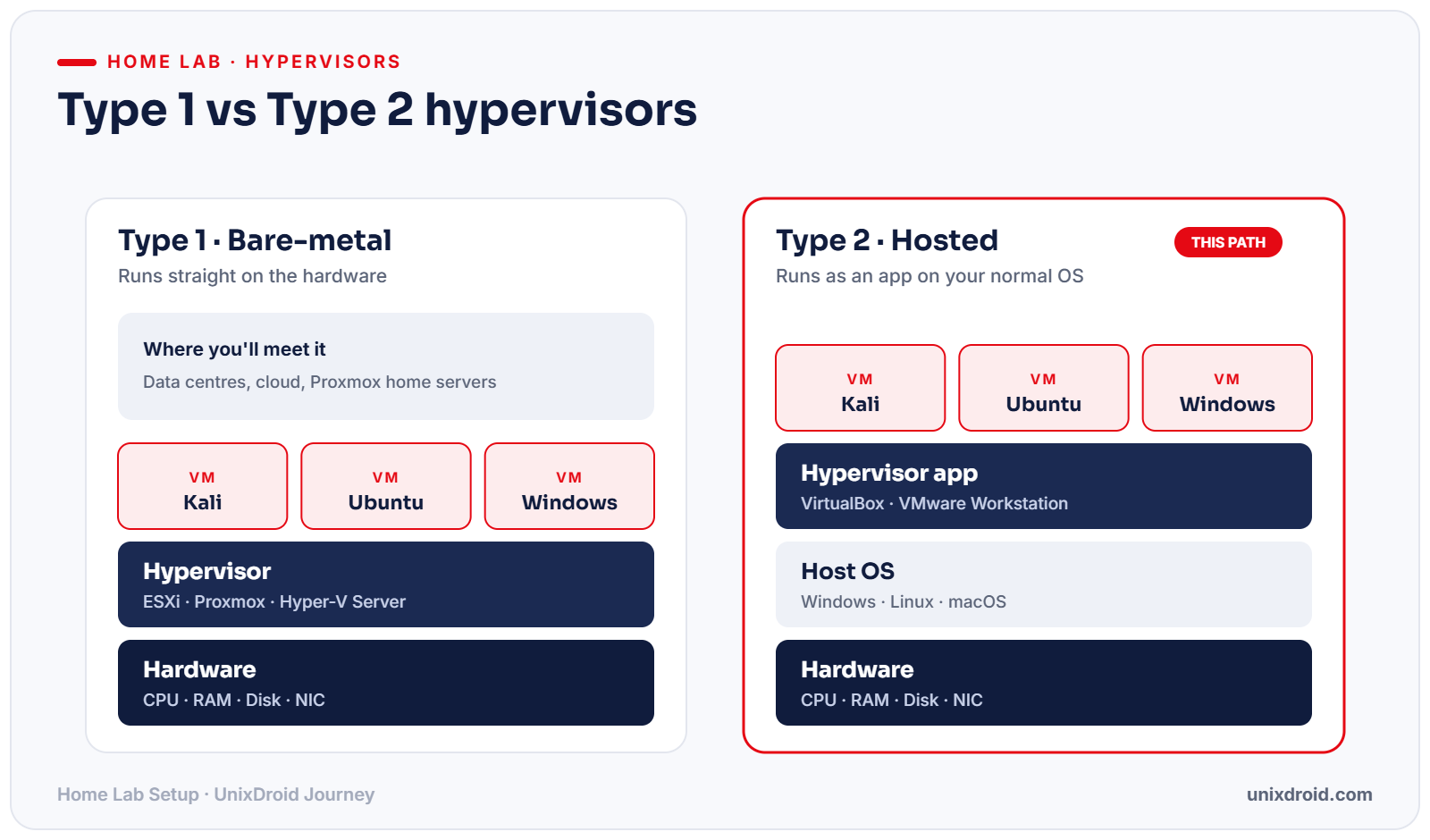
| Type 1 (bare-metal) | Type 2 (hosted) | |
|---|---|---|
| Runs on | The hardware directly | Your normal OS, like an app |
| Examples | VMware ESXi, Proxmox, Hyper-V Server | VirtualBox, VMware Workstation |
| Used for | Data centres, cloud, dedicated home servers | Learning labs on a laptop or desktop |
This path uses a Type 2 hypervisor, because it installs on the PC you already have.
Which hypervisor should you use?
| Hypervisor | Cost | Runs on | Notes |
|---|---|---|---|
| VirtualBox | Free, open source | Windows, Linux, macOS | Used in this path. Same steps on every OS |
| VMware Workstation Pro | Free for personal use | Windows, Linux | A bit faster for heavy Windows VMs |
| Hyper-V | Built into Windows Pro | Windows | Good, but slows VirtualBox down if left on |
| UTM / VMware Fusion | Free | Apple Silicon Macs | ARM-only guests (see the note below) |
Apple Silicon Mac (M1–M4)? These chips can only run ARM64 VMs at full speed. Kali, Parrot, Ubuntu and Windows 11 all have ARM64 versions, so most of this path works. Metasploitable 2 and many older vulnerable VMs are x86-only, so use online labs like TryHackMe or Hack The Box for those.
What hardware do you need?
| Part | Minimum | Recommended | Why it matters |
|---|---|---|---|
| CPU | 4 cores with VT-x / AMD-V | 6–8 cores | Each VM needs 1–2 cores |
| RAM | 8 GB | 16 GB or more | RAM decides how many VMs run at once |
| Disk | 100 GB free | 250 GB+ on an SSD | VMs on a hard disk feel painfully slow |
RAM is the real limit. You never run the whole lab at once, only the machines a given exercise needs. Leave about 4 GB for your host OS, then budget:
| Exercise | VMs running | RAM needed |
|---|---|---|
| Pentest practice | Kali + Metasploitable 2 | about 4.5 GB |
| Linux server practice | Kali + Ubuntu Server | about 6 GB |
| Active Directory practice | Kali + Windows Server + Windows 11 | about 12 GB |
With 8 GB of RAM, run two small VMs at a time. With 16 GB you can do everything in this path.
The lab you'll build
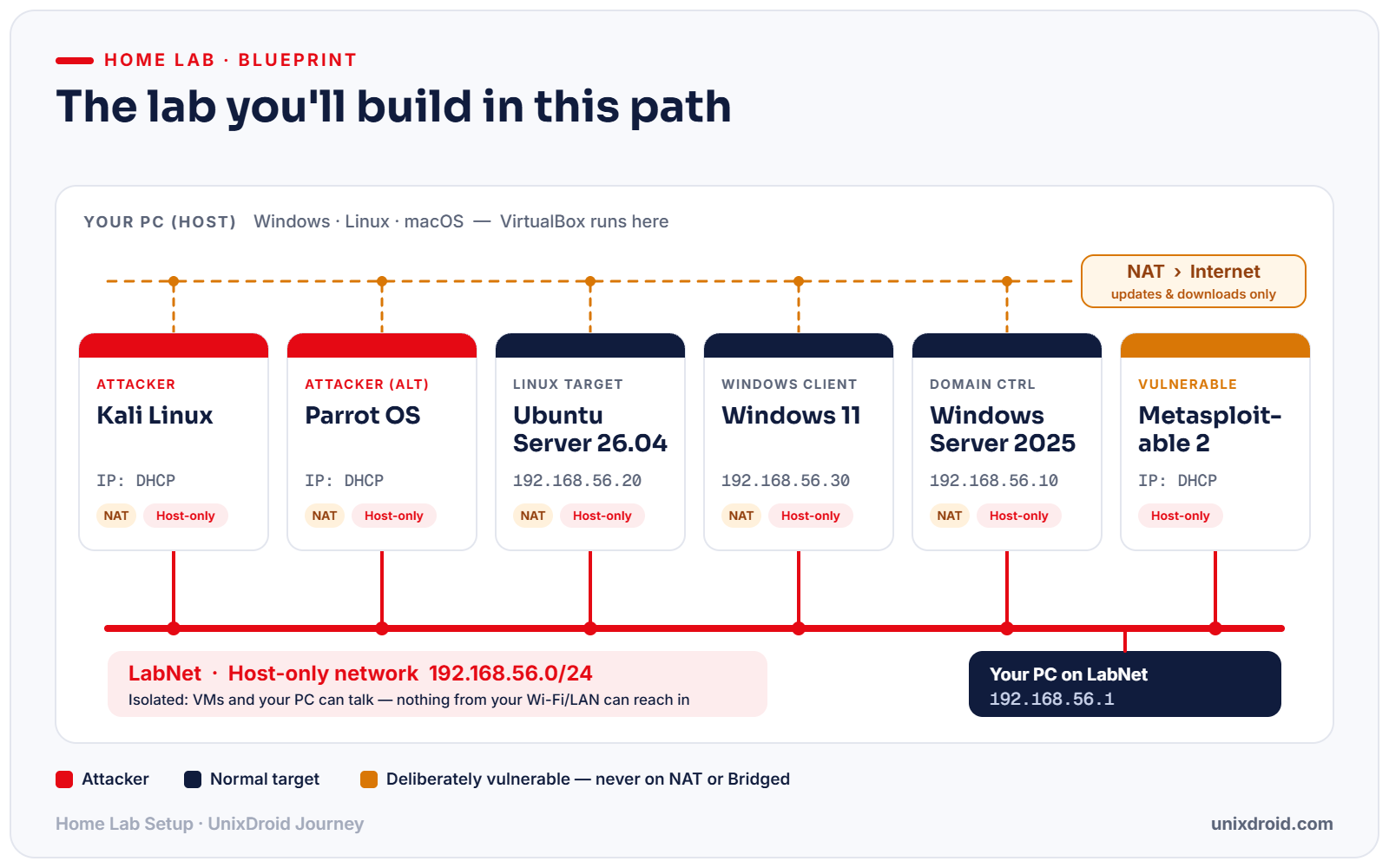
- VirtualBox on your PC, with hardware virtualization switched on
- LabNet, a private host-only network: 192.168.56.0/24
- Kali Linux, your main attacker machine (Parrot OS as an alternative)
- Ubuntu Server, a Linux target
- Windows 11 and Windows Server 2025 with a real Active Directory domain
- Metasploitable 2, a machine full of holes, for safe exploitation practice
- Snapshots, clones and OVA images, so you can reset or rebuild anything fast
The 4 golden rules of a home lab
- Only attack machines you own: your lab VMs, or platforms that give you permission.
- Vulnerable VMs never touch your real network. No Bridged or NAT adapter for them, ever.
- Snapshot before you break something. Rolling back is faster than reinstalling.
- Keep a lab notebook with every VM's name, IP, username and what you changed. Future you will thank you.