
You've built a full lab. Now learn to protect it. Snapshots let you break things without fear, clones turn one good install into many machines, and exporting an OVA image gives you a real backup you can restore on any PC. This is what separates a lab you rebuild every month from a lab that lasts for years.
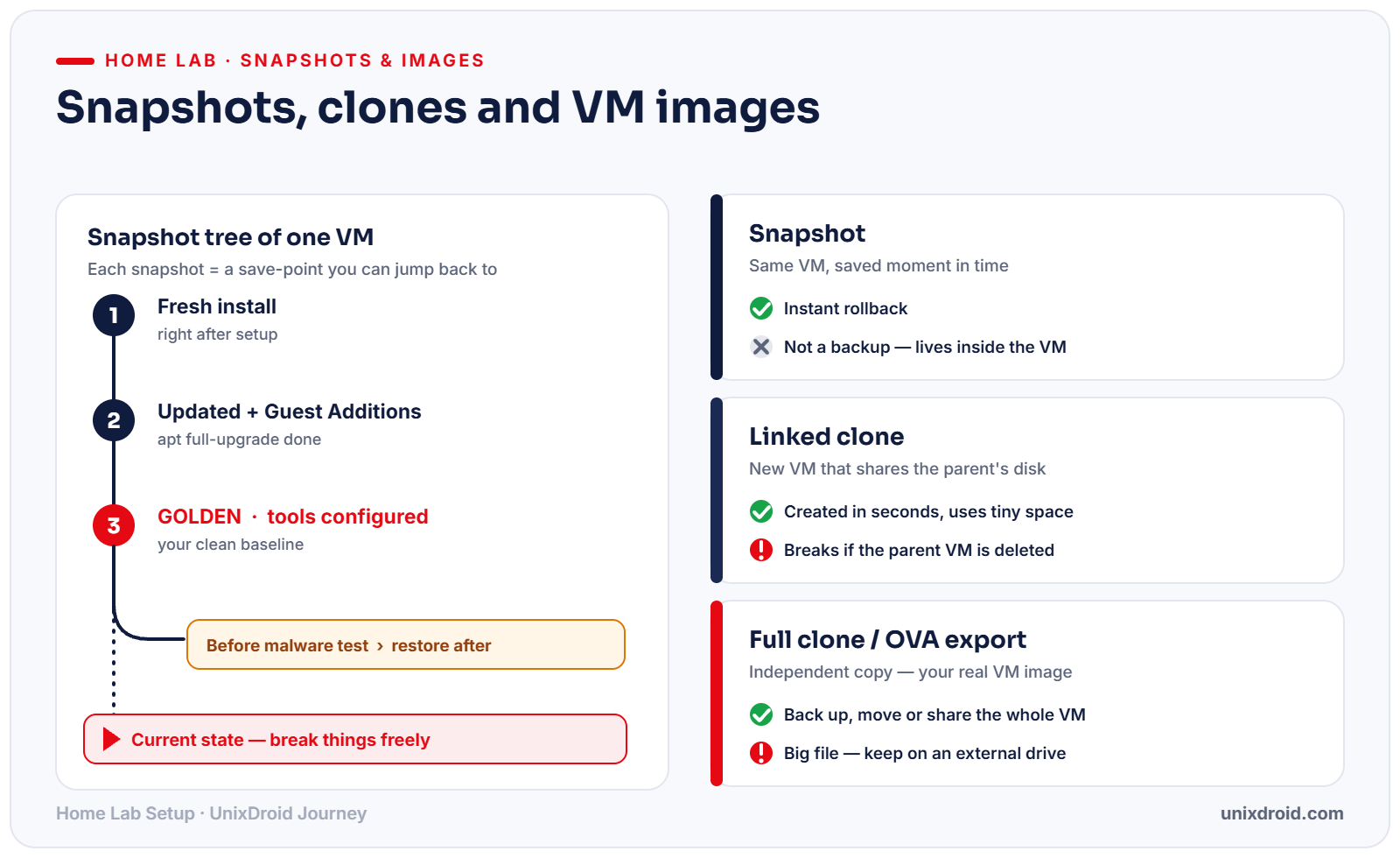
Snapshots: save points for a VM
A snapshot saves a VM's disk exactly as it is (and its memory too, if the VM is running). Restore it, and the VM jumps back to that moment.
In VirtualBox: select the VM → open the Snapshots view → Take. To roll back, select a snapshot → Restore. VirtualBox offers to snapshot your current state first; say yes if there's anything you might want back.
From the command line (the VM must be powered off to restore):
VBoxManage snapshot "Kali" take "clean-install" --description "Fresh install, fully updated"
VBoxManage snapshot "Kali" list
VBoxManage snapshot "Kali" restore "clean-install"
Good snapshot habits:
- Name them by state, not by number:
clean-install,tools-configured,before-malware-test. - Keep only a few per VM. Long chains slow the disk down and eat space.
- Deleting a snapshot merges it into the disk, which can take a few minutes. Don't interrupt it.
- A snapshot is not a backup. It lives inside the VM's folder, and if that drive dies, it dies too.
Clones: one install, many machines
Need a second Ubuntu server? Clone instead of reinstalling. Right-click the VM → Clone:
- MAC Address Policy: Generate new MAC addresses for all network adapters. Two VMs with the same MAC confuse the network.
- Clone type: Full clone: a completely independent copy. Uses full disk space.
- Clone type: Linked clone: shares the parent's disk and only stores the differences. Created in seconds, uses almost no space, but it breaks if you delete the parent.
VBoxManage clonevm "ubuntu-srv" --name "ubuntu-srv-2" --snapshot "clean-install" --options link --registerMake a Linux clone unique
Clones are perfect copies, including their identity. Inside the clone, run:
sudo truncate -s 0 /etc/machine-id && sudo systemd-machine-id-setup   # new machine ID
sudo rm /etc/ssh/ssh_host_* && sudo dpkg-reconfigure openssh-server    # new SSH host keys
sudo hostnamectl set-hostname ubuntu-srv-2
Then change its static IP in /etc/netplan/60-labnet.yaml (for example to 192.168.56.21) and run sudo netplan apply.
Make a Windows template with Sysprep
Windows clones share the same internal SID, which causes trouble when they join a domain. The fix is Sysprep, which "generalizes" Windows so every clone boots up as a brand-new PC:
- Install Windows 11 with Guest Additions and updates, and don't join it to the domain.
- Take a snapshot (in case Sysprep fails), then run in an Administrator prompt:
C:\Windows\System32\Sysprep\sysprep.exe /generalize /oobe /shutdownThe VM shuts down. Don't boot it again. It's now your golden image. Each clone you make from it starts at the Windows setup screens with a fresh identity.
Never Sysprep your domain controller. Only use it on template client machines. If it fails, the reason is in
C:\Windows\System32\Sysprep\Panther\setupact.log.
OVA export: your VM as a single image file
An OVA file packs a VM's settings and disks into one file. It's how VulnHub shares machines, and it's the best way to back up your own.
File → Export Appliance → pick the VMs → Format OVF 2.0, file name e.g. kali-golden.ova → MAC Address Policy Strip all network adapter MAC addresses if you'll share it → tick Write Manifest file (adds checksums) → Finish.
VBoxManage export "Kali" --output kali-golden.ova --ovf20 --manifest   # export
VBoxManage import kali-golden.ova                                       # restore anywhere
Save exports to an external drive or another disk. That's your real backup. To relocate a VM within the same PC instead, right-click it → Move.
Your lab maintenance routine
| When | Do this |
|---|---|
| After a fresh install or big change | Snapshot (e.g. clean-install) |
| Before malware or risky tests | Snapshot, plus switch to an Internal network |
| Every week or two | Update Kali/Parrot, re-snapshot |
| Monthly, or before a reinstall of your PC | Export golden VMs as OVA to an external drive |
| Windows evaluation about to expire | Build a fresh VM from your Sysprep golden image |
🎉 Path complete
You now own a real cybersecurity lab: VirtualBox tuned for speed, an isolated LabNet, Kali and Parrot as attackers, Ubuntu Server, a Windows Active Directory domain, Metasploitable 2 for exploitation, and the snapshot and backup skills to keep it all safe. Every other path on UnixDroid assumes this lab. Next, put it to work in Ethical Hacking, SOC Analyst or Networking for Security.