
Most people imagine hacking as someone breaking through a firewall with clever code. In real life, a huge number of accounts are lost in a much simpler way: someone sends a message, and the victim types the password in themselves. That is phishing.
It works because it doesn't attack your computer. It attacks your attention. A busy person reading an email on a phone at 9 AM is the perfect target.
In this post we'll take one fake bank email apart, piece by piece. By the end you'll be able to spot the tricks in a few seconds, read any link properly, and know exactly what to do if you, or someone at home, has already clicked.
What phishing actually is
Phishing is a message that pretends to come from someone you trust, so that you do something harmful: click a link, open a file, share an OTP, or send money.
It shows up in a few forms:
| Type | Where it arrives | Common example |
|---|---|---|
| Email phishing | Your inbox | "Your account will be suspended" |
| Smishing | SMS | "Your parcel is on hold, pay ₹25 to release it" |
| Vishing | Phone call | "I'm calling from your bank's fraud team" |
| Spear phishing | Email, LinkedIn | A message written just for you, with your name, job and company |
The channel changes. The idea stays the same: make you act before you think.
The 5 red flags in one email
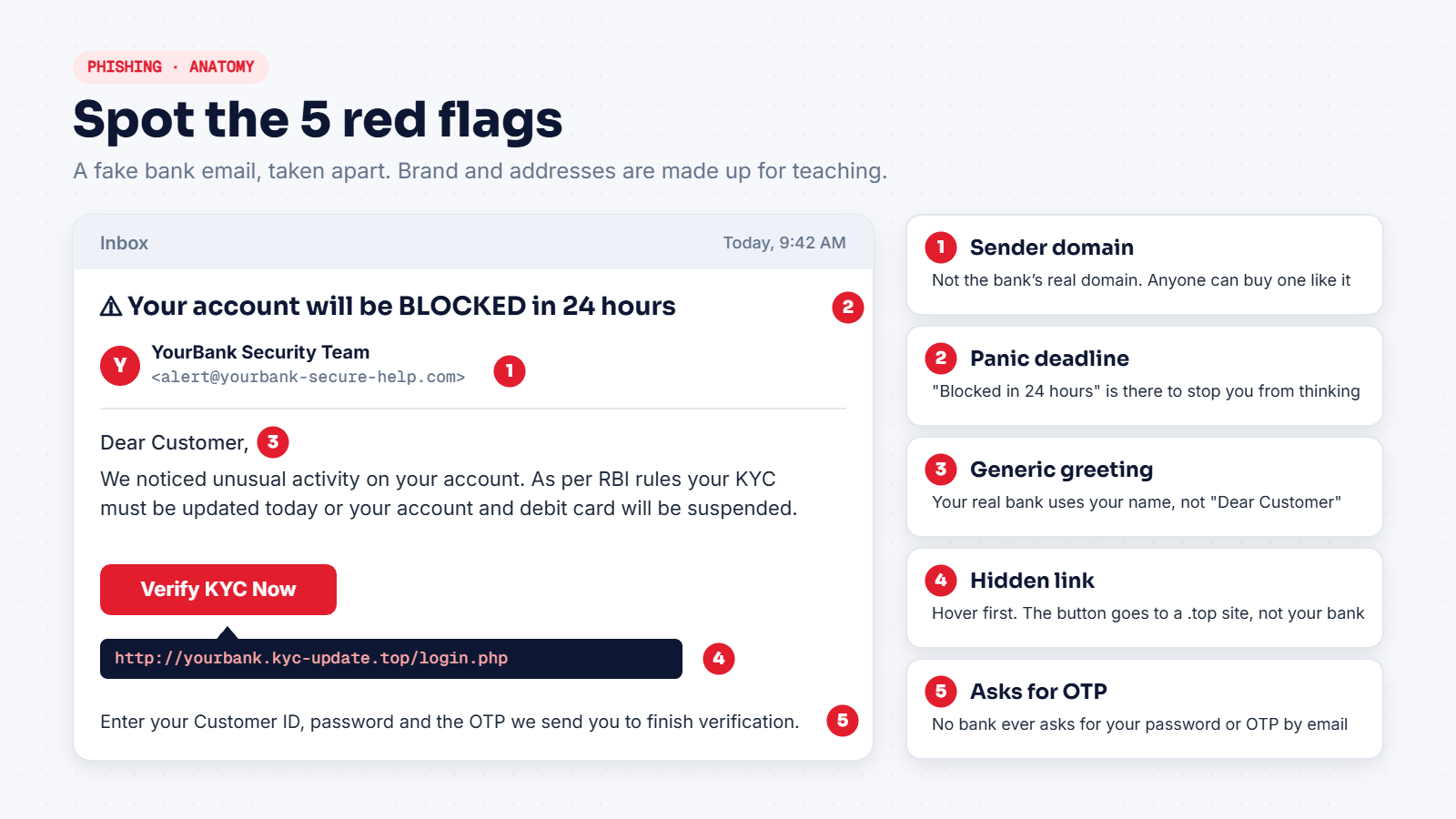
Here's a fake email of the kind that lands in Indian inboxes every day. The bank name and addresses are made up, but every trick in it is one attackers really use.
1. The sender's domain is wrong
Look at what comes after the @. The display name says "YourBank Security Team", but anyone can type any display name. The actual address is alert@yourbank-secure-help.com. A real bank sends from its own domain, not one with extra words like secure, help, verify or support glued on. Domains like that cost a few hundred rupees and take five minutes to register.
On a phone, the mail app often shows only the name. Tap it to see the full address.
2. A deadline built to make you panic
"Blocked in 24 hours." "Last warning." "Immediate action required." Urgency is the most common trick in phishing, because a scared person skips the checks they would normally do. A real bank does not close your account through one email with a countdown.
3. "Dear Customer"
Your bank knows your name. Mass phishing emails go out to thousands of people at once, so they use a generic greeting. This isn't proof on its own (targeted phishing will use your name), but next to the other flags it's a strong sign.
4. The link doesn't go where the button says
The button says "Verify KYC Now". The real destination only shows when you hover over it on a laptop, or press and hold it on a phone: http://yourbank.kyc-update.top/login.php. That is not your bank. The next section shows you how to read links properly, because this one skill stops most phishing.
5. It asks for something no bank asks for
Customer ID, password and OTP, all in one form. No bank, wallet or government office will ask for your OTP or password by email, SMS or phone call. If a message asks for an OTP, that alone is enough reason to stop.
One red flag can be an accident. Two or more means scam until proven otherwise.
How to read a link in 5 seconds
Attackers know people glance at a link and look for the brand name somewhere inside it. So they put the brand name at the start, and their own domain at the end.
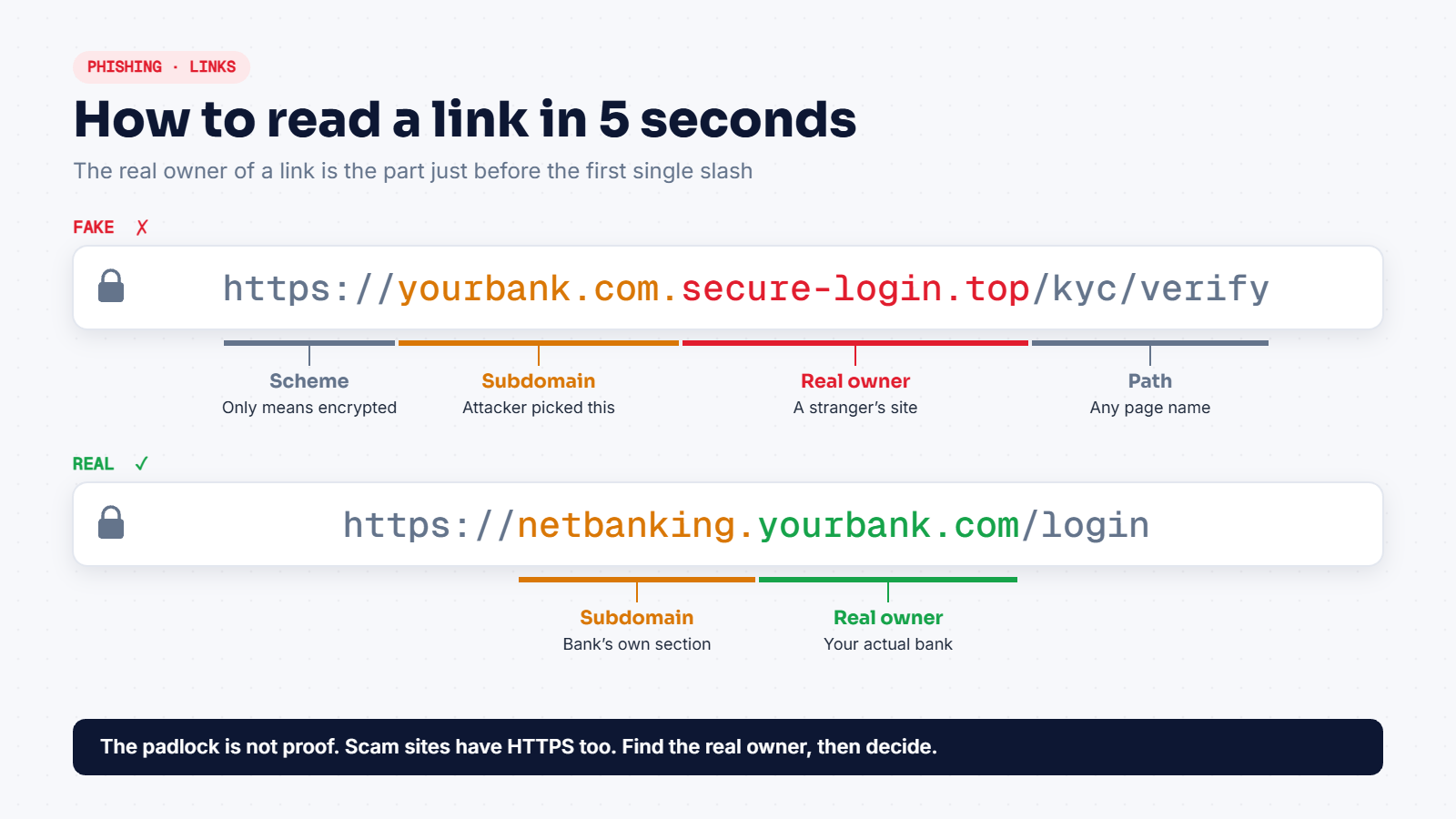
Here's the method:
- Find the part between
https://and the next single/. That part is the host. - Read the host from the right. The last two pieces, like
secure-login.toporyourbank.com, are the real owner. For Indian domains ending in.co.inor.gov.in, take the last three pieces, for exampleexample.co.in. - Everything to the left of that is a label the owner picked. An attacker can make it say anything, including
yourbank.com.
So in https://yourbank.com.secure-login.top/kyc/verify, the owner is secure-login.top. A stranger.
About the padlock: HTTPS only means the connection between you and the site is encrypted. It says nothing about who runs the site. Certificates are free today, so most phishing sites show a padlock too. Don't treat it as a trust badge.
Also watch for lookalike spellings: yourbamk.com, y0urbank.com (a zero instead of an o), or yourbank-in.com. On a small screen these are very easy to miss.
How the attack actually unfolds
It helps to see phishing as a chain. The attacker needs you to finish several steps, and you can break the chain at almost any of them.
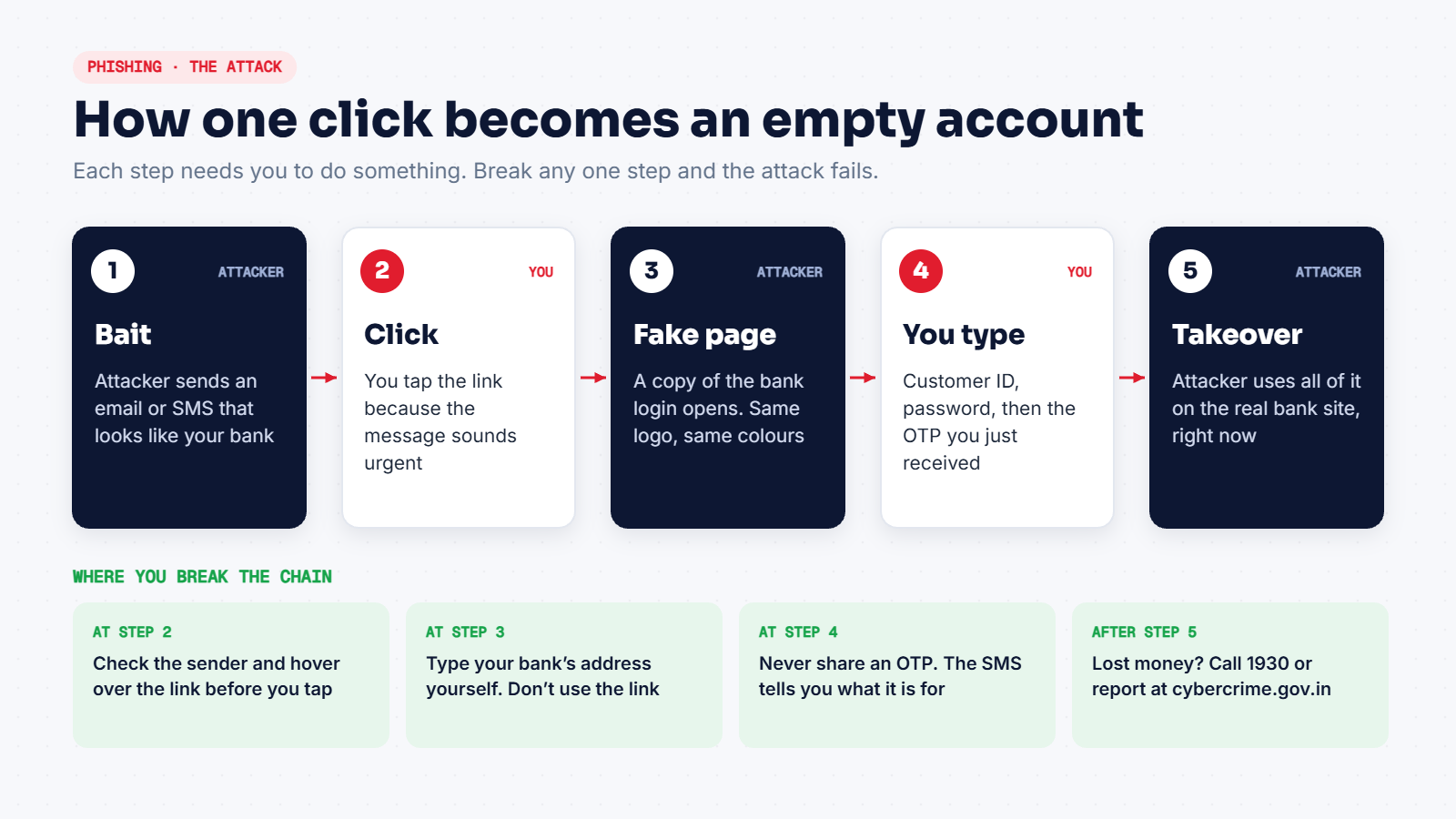
The part people underestimate is step 5. Many believe the OTP keeps them safe. But modern phishing kits pass whatever you type on the fake page straight to the attacker, who enters it on the real bank site while the OTP is still valid. An OTP protects you only as long as nobody else sees it.
This is also why phishing pages look so convincing. Copying a login page's design takes minutes. The logo, colours and layout prove nothing.
Habits that stop almost all of it
You don't need any special software. These habits do most of the work:
- Never use the link in the message. Open your bank's app, or type the address yourself. If the alert is real, you'll see it there too.
- Pause when you feel rushed. That feeling is the attacker's main tool. Give it 30 seconds and most scams become obvious.
- Hover or long-press before you tap. Find the real owner of the link, reading from the right.
- Read the whole OTP SMS. Banks usually say what the OTP is for, such as a payment to a named merchant. If that doesn't match what you are doing, stop.
- Turn on two-step verification for email and social media. Where you can, use an authenticator app instead of SMS.
- Use a password manager. It fills your password only on the exact domain it was saved for. On a fake site the box stays empty, which is a built-in phishing alarm.
Already clicked? Do this, in this order
Mistakes happen, even to people who work in security. What matters is how fast you act.
- If money was taken, call 1930, the national cyber crime helpline, and file a complaint at cybercrime.gov.in straight away. The faster it's reported, the better the chance of the money being held.
- Call your bank on the number printed on your card or on its official website, and block the card or net banking.
- Change the password of the account you entered, and of any other account that uses the same password.
- Sign out of all sessions from the account's security settings.
- If you downloaded a file, disconnect from the internet and run a full scan, or ask someone technical to check the device.
- Tell the people around you, especially if the message came from a friend's hacked account.
Don't feel embarrassed to report it. Every report helps banks and police track the same gang going after other people.
For students: study it from the defender's side
If you're learning cybersecurity, phishing is one of the best topics to start with, because you can practise on your own inbox:
- Open a suspicious email and view the full headers (in Gmail: the three dots, then Show original). Compare the
FromandReturn-Pathaddresses and look at the SPF, DKIM and DMARC results. - Write down the red flags you find, using the five above as a checklist. After ten emails you'll start seeing patterns.
- Never send phishing emails to real people, not even as a prank or "for practice". Companies run phishing simulations only on their own staff, with written approval. Doing it to others can be a criminal offence under the IT Act, including Section 66D (cheating by personation).
Quick recap
- Phishing attacks your attention, not your computer.
- Check the sender's domain, not the display name.
- Urgency plus a link plus a request for a password or OTP means scam.
- Read links from the right. The padlock proves nothing.
- If you clicked and money is involved, call 1930 right away.
Next, learn how attackers find which "doors" are open on a computer in our beginner's guide to ports and protocols.