
Companies moved to the cloud, and hackers followed them. Today a single wrong setting in an AWS or Azure account can expose more data than a hacked server ever could. Customer records, backups, source code and passwords now live in storage buckets and databases that are one click away from being public.
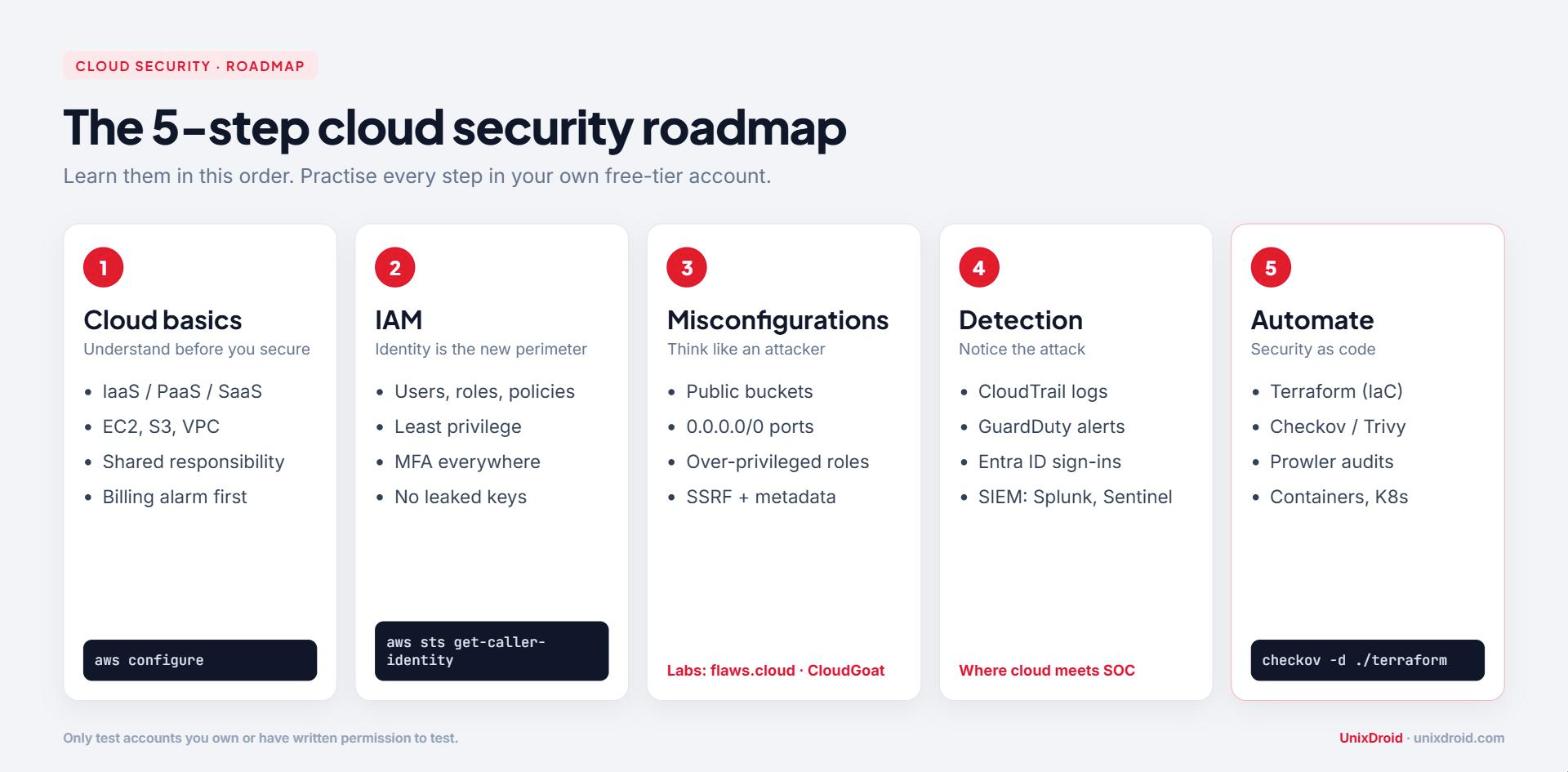
The good news: cloud security is still a young field. A beginner who learns it properly, in the right order, can stand out fast. This post gives you that order: a 5-step roadmap, the tools and free labs for each step, a 90-day plan and answers to the questions beginners ask most.
Before you start: what you should already know
Cloud security sits on top of normal IT skills. You will move much faster if you are comfortable with:
- Linux basics: files, permissions, processes, SSH (start here)
- Networking basics: IP addresses, ports, DNS, HTTP and HTTPS
- One scripting language: Python or Bash, enough to automate small tasks
If these feel shaky, spend two or three weeks on them first. Every cloud attack you study later will make more sense.
Step 1: Learn how the cloud actually works
You cannot secure something you do not understand. Before any security tool, learn the basics of one provider. Start with AWS (it has the most learning material and job postings), then add Azure or GCP later. The concepts transfer: a bucket is a bucket, a role is a role.
- IaaS, PaaS, SaaS: who manages the server, the platform and the app
- Core services: compute (EC2), storage (S3), networking (VPC, subnets, security groups)
- Regions and accounts: where your resources live and how companies separate them
- The shared responsibility model: the provider secures the data centre and hardware; you secure your data, identities and configuration
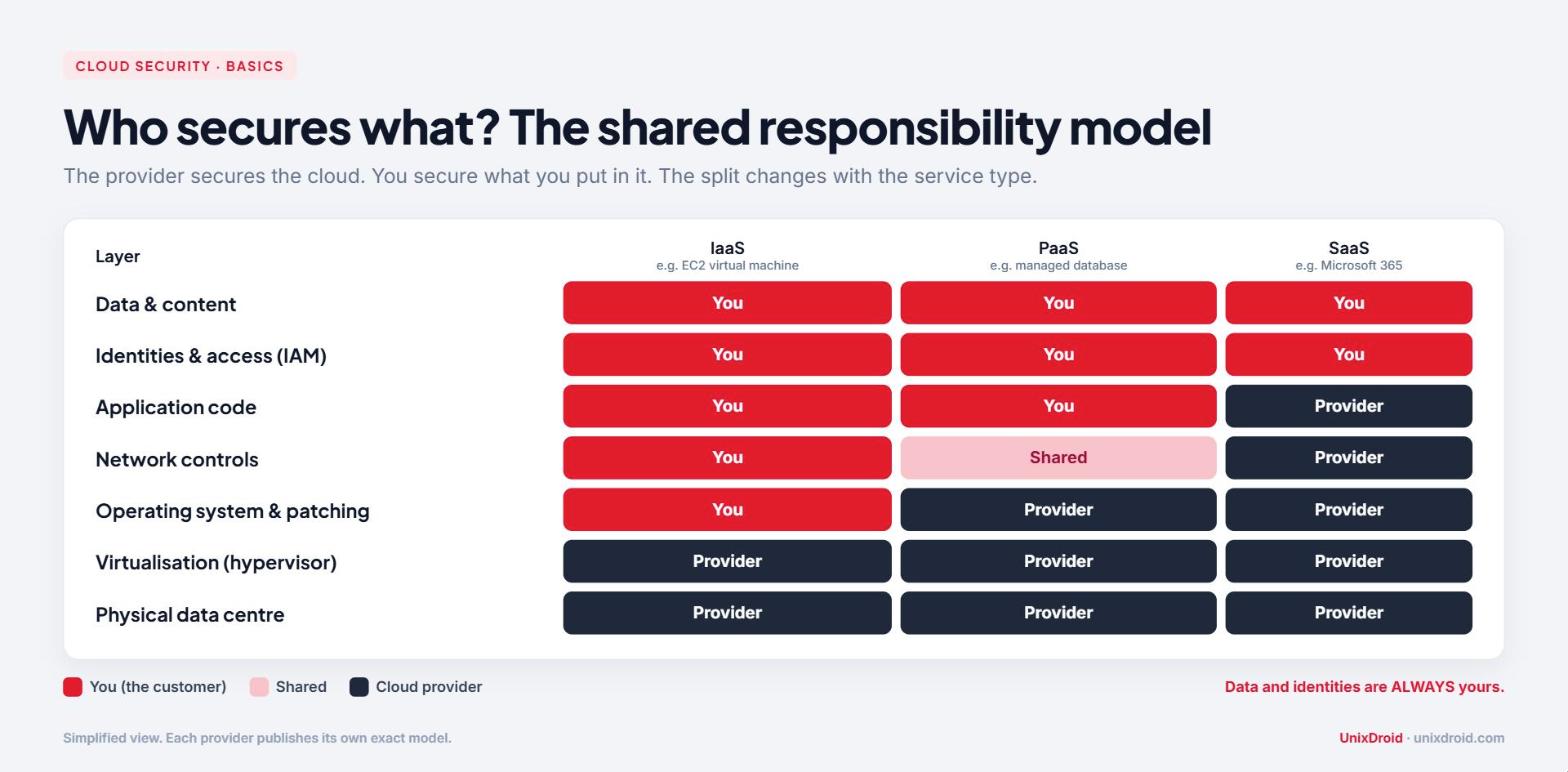
That last point is the most important idea in this whole post. Look at the table above: no matter which service type you use, your data and your identities are always your job. Almost every cloud breach you read about is a customer mistake, not a provider failure.
Before you create anything, set a billing alarm. A forgotten resource can cost real money, and a leaked key can be used to run crypto-miners on your bill.
Step 2: Master Identity and Access Management (IAM)
In the cloud, the network is no longer the main wall. Identity is the new perimeter. If an attacker steals a valid access key, they do not need to hack anything. They just log in.
Learn these concepts:
- Users, groups, roles and policies: who can do what, on which resource
- Least privilege: give only the permissions a job needs, nothing more
- MFA on every human account, especially the root account
- Roles instead of long-lived access keys wherever possible
- Policy evaluation: an explicit deny always beats an allow
A very common real-world mistake is pushing access keys to a public GitHub repo. Bots scan GitHub constantly and abuse leaked keys within minutes. Tools like gitleaks or trufflehog can scan your own repos for secrets before you push.
Get comfortable checking "who am I and what can I do" from the CLI:
aws sts get-caller-identity
aws iam list-attached-user-policies --user-name your-user
aws iam get-account-summary
Practice task: create a user that can only read one S3 bucket. Then try to delete that bucket with the user's keys and confirm you get an AccessDenied error. That one exercise teaches you more IAM than an hour of videos.
Step 3: Think like an attacker (misconfigurations)
Now learn how cloud accounts actually get broken into. The top causes are boring, and that is exactly why they work:
- Public storage buckets with sensitive files
- Security groups open to the world (0.0.0.0/0 on SSH, RDP or databases)
- Over-privileged roles attached to servers and functions
- Leaked or long-lived access keys in code, Docker images or CI logs
- The instance metadata service: an SSRF bug in a web app can let an attacker read temporary credentials from the server
Here is how those small mistakes chain together into a real breach:
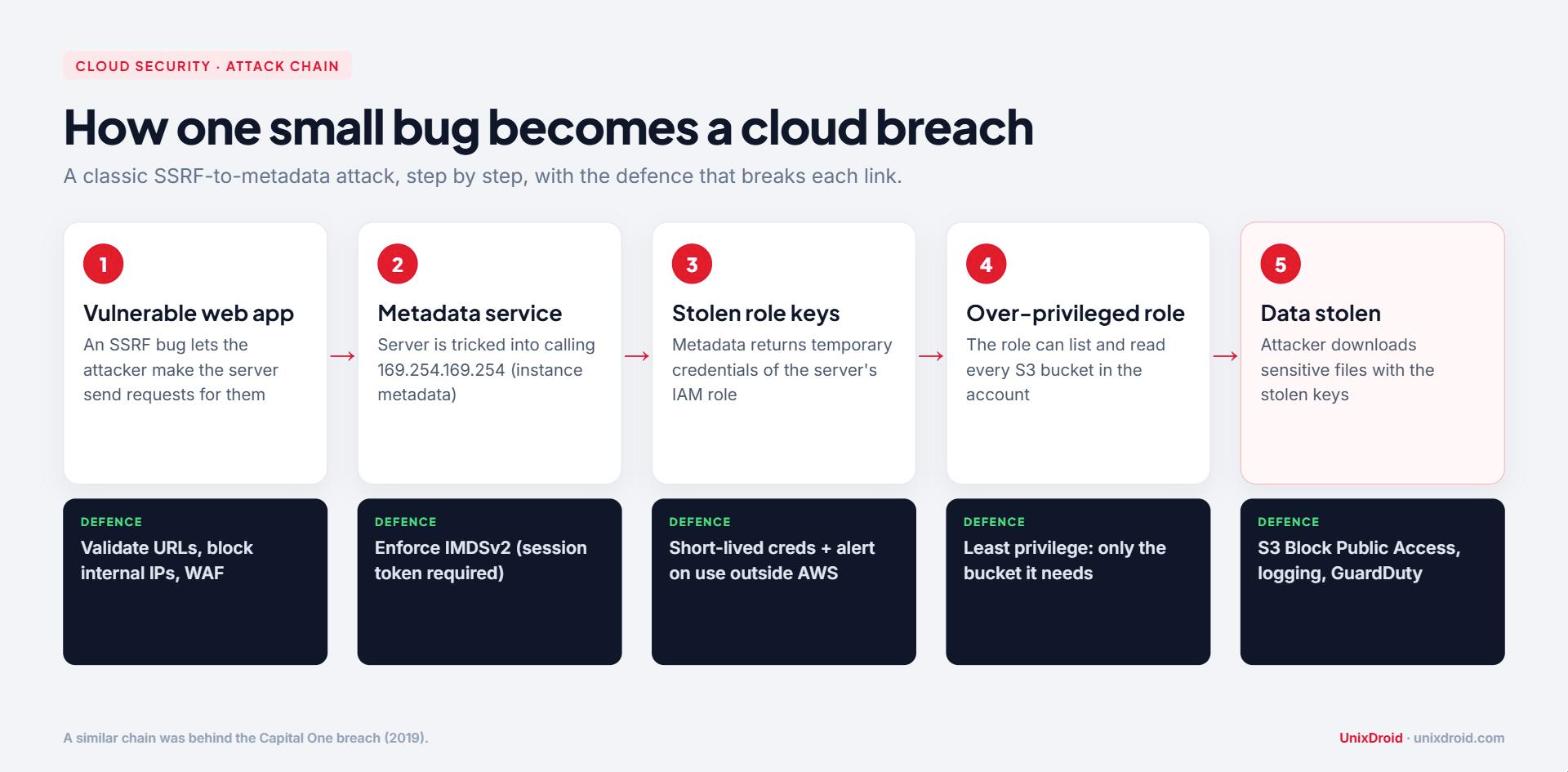
This is roughly what happened in the well-known Capital One breach in 2019. Notice that every link in the chain has a defence. Breaking any one of them stops the attack. That is the mindset of a good cloud defender.
Test a bucket you created yourself, with no credentials:
aws s3 ls s3://your-test-bucket --no-sign-requestIf that lists files, anyone on the internet can see them too.
Free labs to practise legally:
- flaws.cloud and flaws2.cloud: AWS challenges you solve in the browser, with hints
- CloudGoat by Rhino Security Labs: a deliberately vulnerable AWS environment you deploy in your own account (destroy it after each session to avoid bills)
Step 4: Logging, monitoring and detection
Attacks will happen. The question is whether you notice. This is where cloud security meets SOC work.
- AWS: CloudTrail (who did what, via API), GuardDuty (threat detection), CloudWatch (metrics and alarms), VPC Flow Logs (network traffic)
- Azure: Entra ID sign-in logs, Microsoft Defender for Cloud, Microsoft Sentinel
- Send logs to a SIEM like Splunk or Sentinel and write simple detections
Learn to read a CloudTrail event. Four fields answer most investigation questions:
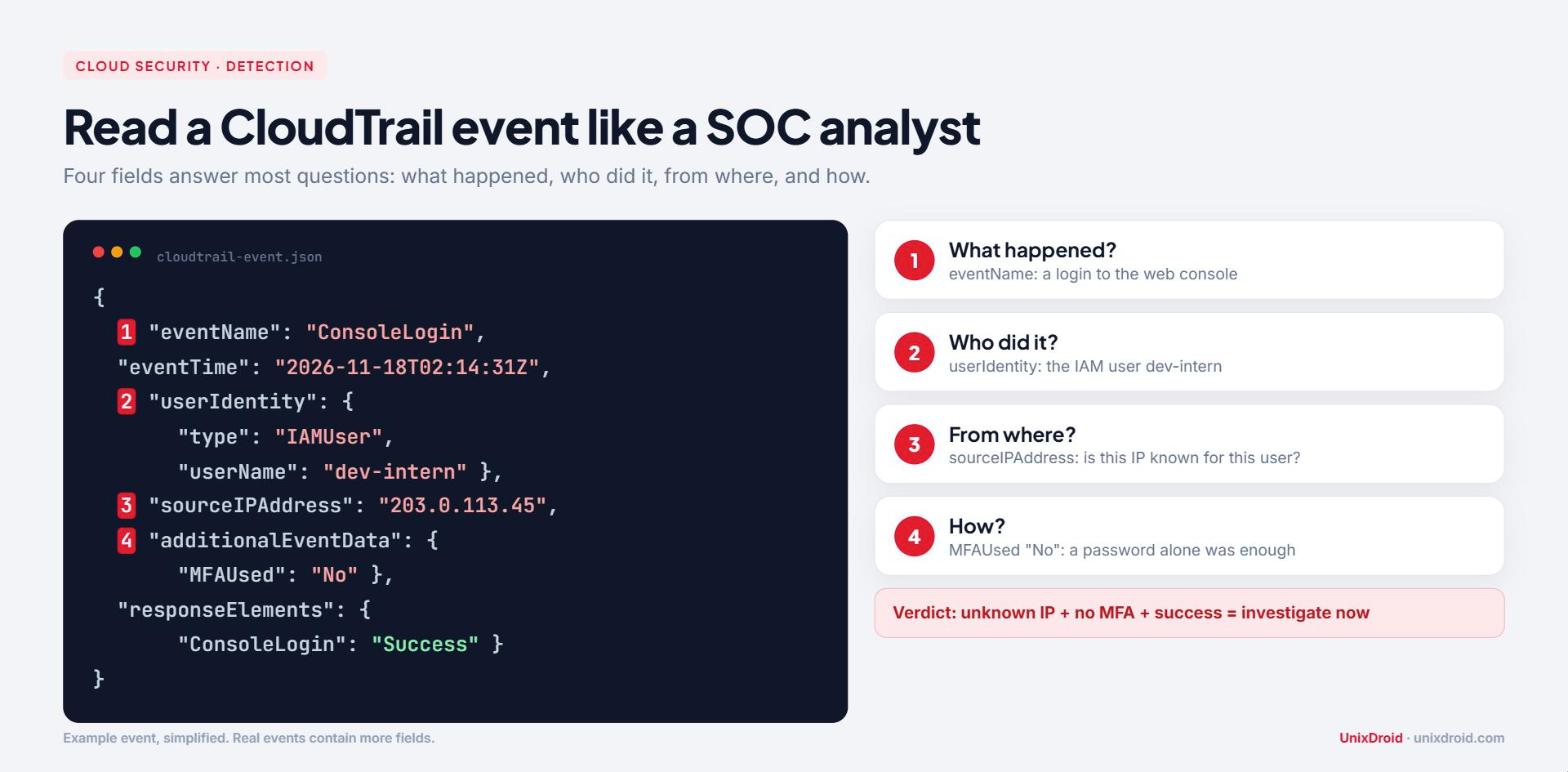
A console login from an unknown IP, without MFA, is exactly the kind of alert you should be able to explain. Other events worth alerting on:
- ConsoleLogin from a new country or without MFA
- CreateAccessKey or AttachUserPolicy (someone giving themselves more power)
- StopLogging or DeleteTrail (an attacker trying to hide)
- PutBucketPolicy that makes a bucket public
Step 5: Automate and specialise
Real companies do not click around the console. They build cloud resources with code, and they check that code for security problems before it goes live.
- Infrastructure as Code: learn the basics of Terraform
- Scan IaC for misconfigurations: Checkov or Trivy
- Audit a whole account: Prowler or ScoutSuite
- Containers and Kubernetes: Docker basics, then Kubernetes security (RBAC, secrets, network policies)
pip install checkov
checkov -d ./terraform
Once you are comfortable, pick a certification to prove your skills, for example AWS Certified Security - Specialty, Microsoft AZ-500 or CCSK. Check the current exam version on the official site before you start studying.
A simple 90-day plan
- Days 1-30: Linux and networking refresh, create an AWS free-tier account, billing alarm, IAM users, roles and policies
- Days 31-60: solve flaws.cloud and flaws2.cloud, deploy and break CloudGoat scenarios, write down how each attack worked
- Days 61-90: turn on CloudTrail and GuardDuty, write 3 detections in a SIEM, scan a small Terraform project with Checkov, run Prowler on your own account
At the end, publish a short write-up of each lab on GitHub or LinkedIn. Recruiters trust a project they can read more than a line on a CV.
Free resources
- AWS Skill Builder and Microsoft Learn: free official courses for the basics
- flaws.cloud, flaws2.cloud and CloudGoat: hands-on attack practice
- Our free resources page: cheatsheets, roadmaps and lab guides
FAQ
Do I need to be a programmer? No, but you need basic scripting. Reading a JSON policy, a Terraform file and a short Python script is enough to start.
Can I learn without spending money? Mostly, yes. Free tiers and free labs cover the basics. AWS asks for a payment card at sign-up, so set a billing alarm and delete what you create after every session.
AWS, Azure or GCP first? AWS for learning material, Azure if your target companies use Microsoft 365 heavily. The concepts carry over, so do not overthink it.
Is cloud security a good career? Almost every company now runs something in the cloud, and people who understand both cloud and security are still hard to find. It is one of the strongest specialisations you can pick in 2026.
Your 5-step checklist
- Learn one cloud provider and the shared responsibility model
- Master IAM and least privilege
- Practise misconfigurations on flaws.cloud and CloudGoat
- Learn CloudTrail, GuardDuty and a SIEM
- Automate with Terraform and scan with Checkov or Prowler
Start with Step 1 this week, and only ever test accounts you own or have written permission to test.